- 22 -
IDEAL 4810-95/EP • IDEAL 4850-95/EP • IDEAL 5221-95EP • IDEAL 6550-95EP
cm
inch
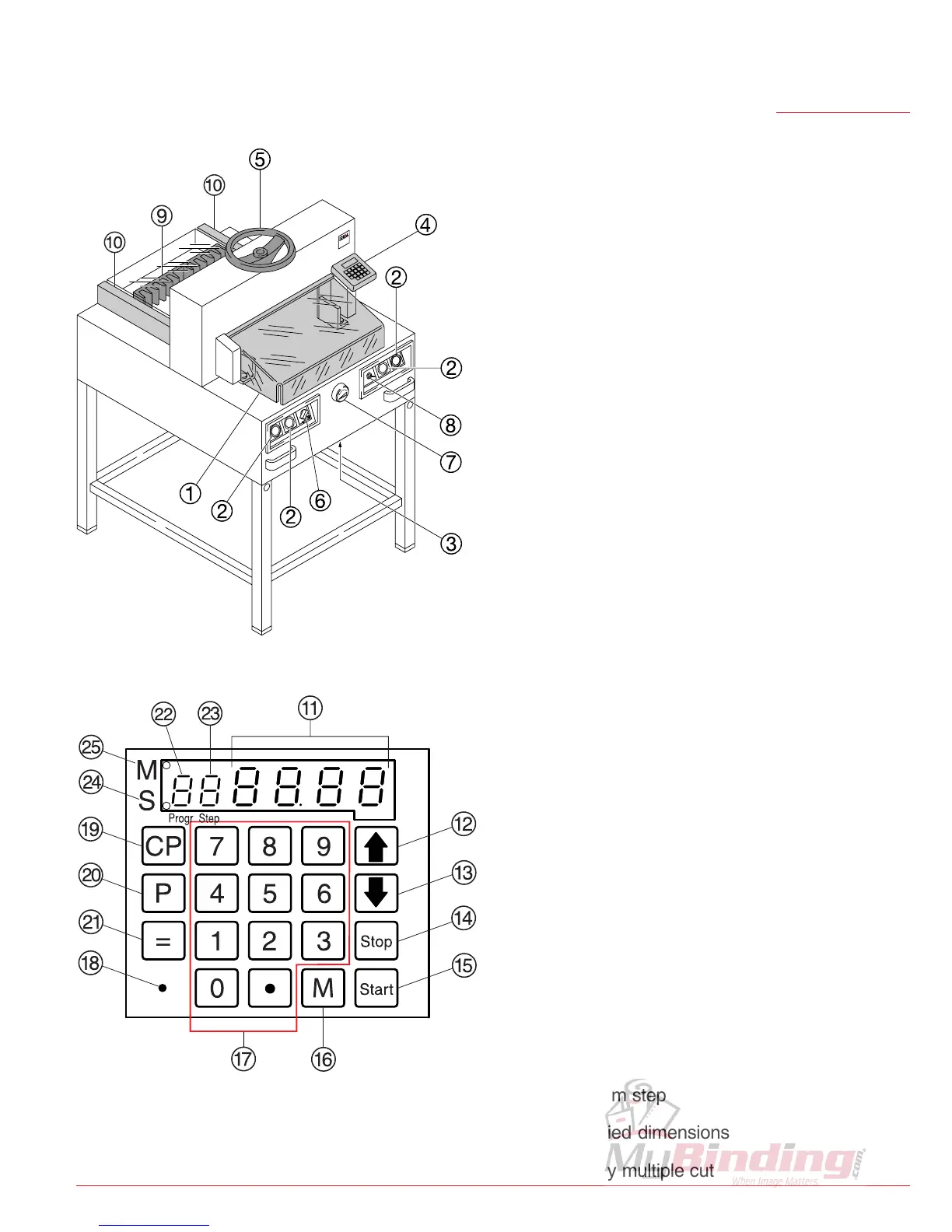
Operating elements
A
- Front safety guard
B
- Safety two-handed control system
Pre-clamping and cutting
C
- Overload switch
(blade drive/clamp drive/
backgauge drive)
D
- Backgauge control (EP)
E
- Paper clamp
(only IDEAL 4810-95/EP)
F
- Main switch
G
- Hand-wheel (EP) or crank handle
for backgauge setting
H
- Key switch
I
- Backgauge
J
- Side lay left and right
K
- Display cutting size (EP, cm or inch)
L
- Select program step up
M
- Select program step down
N
- Stop and delete input
O
- Start
P
- Memory multiple cut
Q
- Keypad
R
- Changeover cm - inch
S
- Clear program
T
- Select program
U
- Enter
V
- Program number
W
- Program step
X - Specified dimensions
Y - Display multiple cut
•
Operation
•



 To Next Page