myPOS Smart Technical Specicaon & Warranty (Updated March 2018) | page 13
myPOS Combo - User Manual | page 13
myPOS Combo functions
For beer user experience and convenience all funcons of your myPOS Combo are
divided in two groups – TRANSACTIONS (Menu buon ) and SETTINGS (FUNC
buon). From the home screen (any other screen by pressing red key (X CANCEL)
rst) you can select the TRANSACTION menu by pressing Menu buon key or you
can select the SETTINGS menu by pressing Up Arrow key.
Transaction menu
Menu buon ( )
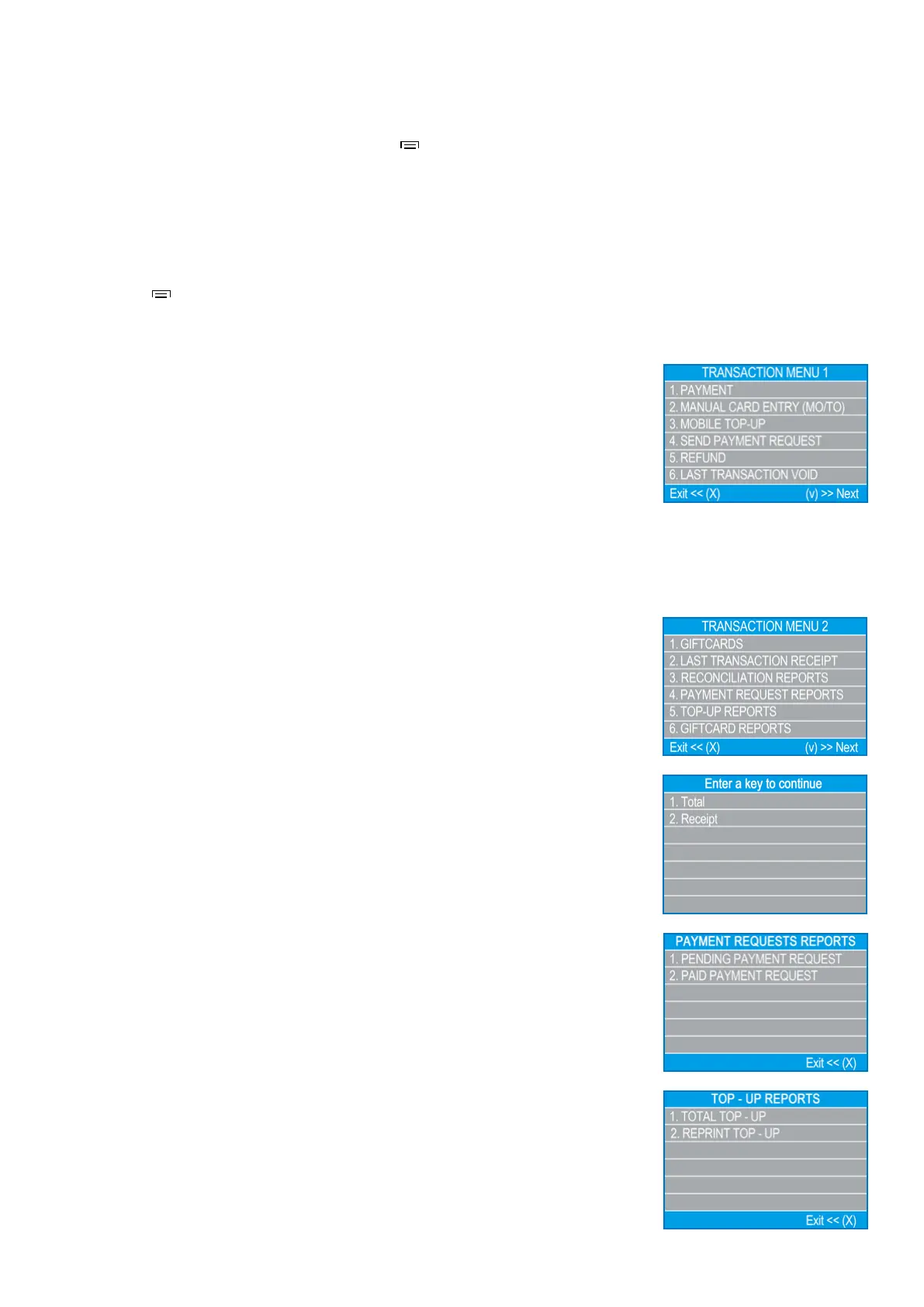
TRANSACTION menu is organized in two screens with the following opons:
TRANSACTION MENU 1 shows the list of supported types of payment transacons
on your myPOS Combo device:
1. PAYMENT
2. MANUAL CARD ENTRY(MO/TO)
3. MOBILE TOP-UP
4. SEND PAYMENT REQUEST
5. REFUND
6. LAST TRANSACTION VOID
Please refer to secon “Accepng Payment” for a detailed descripon of each
transacon. The default transacon type for your myPOS Combo is Payment. You
cannot change the transacon type during an operaon. If you make a mistake, use
(X CANCEL) to cancel the operaon.
TRANSACTION MENU 2 shows the list of operaons and funcons related to
payment transacons:
TRANSACTION MENU 2 shows the list of operaons and funcons related to
payment transacons:
1. GIFTCARDS
SALE OF NEW CARD
Load amount to Private Label Gi Card
PAYMENT WITH GIFTCARD
Accept payment with GiCard
CHECK BALANCE
Check GiCard balance
VOID OF CARD SALE
Void last GiCard sell
2. LAST TRANSACTION RECEIPT
Using this funcon, you can reprint the receipt from the last payment transacon.
3. RECONCILIATION REPORTS
This funcon shows reconciliaon statements (Reports) of all processed transacons.
By pressing (1) on the keyboard you can select report for Totals and to visualize
summary of all transacons processed for the current period. Current period
includes transacons from the last date (me) you have cleared the report (reset the
totals). In order to start a new period, you should press the green buon (O ENTER).
By pressing (2) on the keyboard you can reprint the report for the previous period.


 To Next Page