
 Need help?
Do you have a question about the MyQ CHAMBERLAIN C2102 and is the answer not in the manual?
Prerequisites and steps for setting up a myQ account and connecting the opener to your Wi-Fi network.
Instructions for downloading the myQ App to set up an account and connect the garage door opener.
Critical warnings and instructions to reduce the risk of severe injury or death during installation.
Explanation of safety reversing sensors, their installation, alignment, and troubleshooting.
Procedure for testing the safety reversal system monthly and after adjustments.
Steps to test the functionality of the safety reversing sensors.
Diagnoses and resolves issues like door not closing, stopping mid-travel, or humming without movement.
Addresses problems with remote programming, unauthorized access, and Wi-Fi setup.
Crucial warning about spring tension and the need for qualified personnel for adjustments.
Procedures to test the safety reversal system and photoelectric sensors.
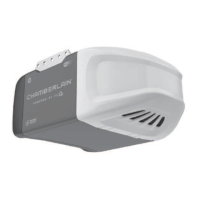
This document serves as a user's guide for Chamberlain Wi-Fi® Garage Door Openers, covering both Chain Drive and Belt Drive models. It provides comprehensive instructions for installation, operation, maintenance, and troubleshooting, emphasizing safety throughout.
The Chamberlain Wi-Fi® Garage Door Opener is a smart device designed to automate the opening and closing of residential garage doors. It integrates Wi-Fi® connectivity, allowing users to control and monitor their garage door remotely via the myQ® App on a smartphone, tablet, or laptop. This connectivity also enables the opener to receive software updates, ensuring it always has the latest operational features. The opener is compatible with myQ® and Security+ 2.0® accessories, enhancing its functionality and security. It is crucial to note that this opener is designed for use with properly balanced and lubricated garage doors and is specifically intended for sectional doors when using unattended close features like Timer-to-Close (TTC) or the myQ® App.
The core function of the opener involves programming travel limits for both the open (UP) and close (DOWN) positions of the garage door. Electronic controls automatically sense and adjust the force required to operate the door. A key safety feature is the Protector System® (Safety Reversing Sensors), which prevents the door from closing if an obstruction is detected in its path. If the light beam between the sensors is obstructed or misaligned while the door is closing, the door will reverse. If the door is already open, it will not close. This system is a mandatory safety device and must be correctly installed and aligned.
The device also includes a battery backup system, allowing the garage door opener to function during power outages. In battery backup mode, the opener operates at a slower speed, and certain features like lights, Timer-to-Close, and remote close (via myQ® App) are disabled. The Automatic Garage Door Lock will unlock when the door is opened in this mode and remain disabled until power is restored.
The garage door opener offers multiple ways to operate the door:
To manually open the door, users can pull down on the emergency release handle. A lockout feature allows the door to be raised and lowered manually as often as needed by pulling the handle down and back. To disengage the lockout feature, the handle is pulled straight down, and the trolley will reconnect the next time the opener is activated.
The opener uses an A19 incandescent (100W maximum) or compact fluorescent 26W (100W equivalent) light bulb. Halogen, short neck, or specialty light bulbs, as well as LED bulbs, should not be used.
Regular maintenance is crucial for safe and trouble-free operation. The guide outlines a maintenance schedule:
The remote control battery (3V CR2032 coin cell) should be replaced when needed. Instructions are provided for prying open the case to access the battery.
Troubleshooting tips are also included for common issues such as the door not closing, vehicle Homelink® programming difficulties, opener beeping, neighbor's remote opening the door, door moving only a few inches, remote control not activating the door, wall-mounted door control not functioning, opener humming with no movement, and inability to connect to the home Wi-Fi® network. For more detailed support, users are directed to support.chamberlaingroup.com or to contact an installing dealer.
 General
| Brand | Chamberlain |
|---|---|
| Model | C2102 |
| Type | Garage Door Opener |
| Connectivity | Wi-Fi |
| Technology | MyQ |
| Battery Backup | No |
| Horsepower | 1/2 HP |
| Remote Control | Included |
| Smartphone Control | Yes |
| Drive Type | Chain Drive |
| Max Door Height | 7 ft |
| Power Source | AC |
| Lighting | LED light |


 To Next Page