
 Need help?
Do you have a question about the MyQ LiftMaster 84501 and is the answer not in the manual?
Instructions for downloading the myQ app, setting up an account, and connecting your opener.
Explains the meaning of WARNING and CAUTION symbols used throughout the manual for safety.
Details the use of features like Timer-to-Close and myQ App for unattended door operation.
Crucial steps and warnings to follow during the installation process to ensure safety.
Explains typical plug-in wiring and permanent wiring procedures for power connection.
Key safety rules to prevent injury or death, including child safety and door operation.
Guide to checking and improving Wi-Fi signal strength in the garage for reliable connectivity.
Steps to set up an account and connect the garage door opener to the myQ app.
Explains the different LED colors and patterns indicating Wi-Fi status and connectivity.
Instructions for programming or reprogramming remote controls and keyless entry devices.
Procedures to erase remote controls, Wi-Fi networks, and camera settings from the opener.
Steps to install and configure the camera for compatible models, including LED status.
How to manually open or close the garage door using the emergency release handle.
Explains operation during power outages, including battery status indicators and feature limitations.
Overview of different control panels (Smart, Multi-Function, Motion-Detecting) and their buttons.
Details the automatic lock feature for Model 87802 and its behavior during power outages.
Guide to installing and aligning the safety reversing sensors for proper operation.
Explains the electronic controls for adjusting door travel limits and force settings.
Identifies the location and function of the UP, DOWN, and Adjustment buttons.
Step-by-step instructions to set the upper and lower travel limits for the garage door.
Procedures to test the safety reversal system monthly and after adjustments.
How to verify the proper function of the safety reversing sensors.
Recommended monthly and yearly maintenance tasks for the garage door opener.
Solutions for frequent problems like connectivity, remote control, and operational errors.
Explains the risks associated with garage doors and the importance of safe practices.
Advice on child safety, preventing play with controls, and keeping them away from moving doors.
How to visually inspect parts and test manual door operation for balance and smooth movement.
Procedures to test the opener's safety features, including the 2x4 test and sensor block test.
Instructions on how to find model numbers for ordering replacement parts.
Details the warranty periods for various components and terms of coverage.
 General
| Type | Garage Door Opener |
|---|---|
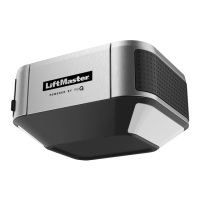
| Model | 84501 |
| Brand | LiftMaster |
| Motor Power | 1/2 HP |
| Battery Backup | No |
| Security | Security+ 2.0 |
| Drive | Chain Drive |
| Motor | DC Motor |
| MyQ Technology | Yes |
| Lighting | LED |
| Remote Control | Yes |
| Drive Type | Chain Drive |
| Number of Remotes Included | 1 |
| Wall Console Included | Yes |
| Light Included | Yes |
| Compatibility | MyQ |
| Max Door Height | 7 ft |
| Smart Features | Yes |
| Smartphone Control | Yes, with MyQ app |


 To Next Page