OR Wired Internet connection: This is the recommended way to connect the
box to your Internet, but unfortunately, sometimes the modem/router is too far
from your mySDATV box location and it’s not possible to run an Ethernet cable.
If it is possible connect an Ethernet cable (not included) from your Internet modem/
router to the Ethernet Port on the back of your mySDATV box. This connction is
more stable then Wi-Fi and also does not require use of password.
(1)
(2)
STEP 5
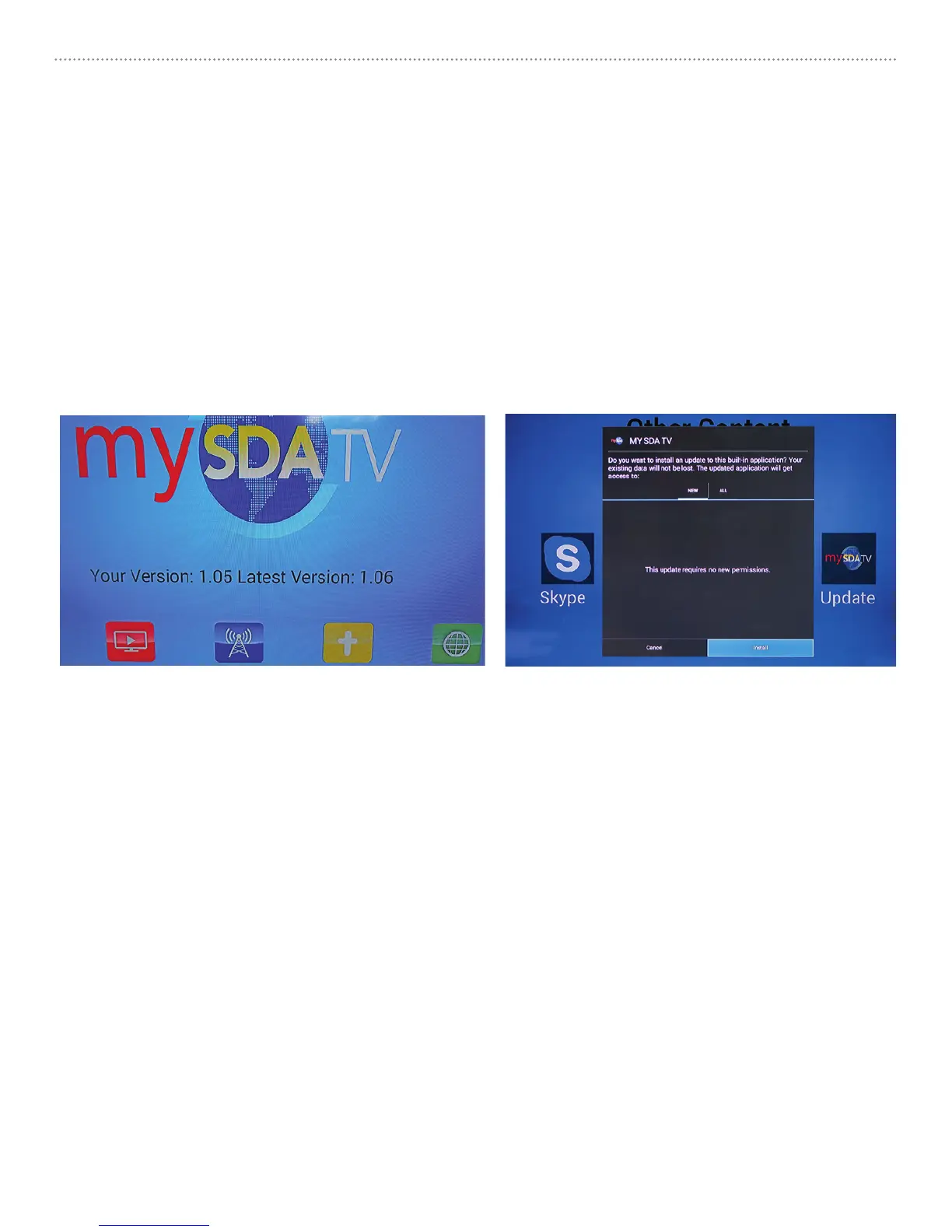
If your Software Version shown on home page (image 1) is different than the
latest version shown. Use remote control [RIGHT/LEFT] arrow keys to navigate to
OTHER icon (yellow) and select [OK] button. Then select UPDATE icon and your box
will be updated to the latest software version. (image 2) In order to complete the
update, you must arrow [DOWN] until highlighting the INSTALL button and press
[OK]. After update, reset your box by selecting mySDATV icon from MyApps on
screen or unplugging the power from the box and plugging it back in.
REMEMBER TO: ALWAYS update to the latest software version to get our newest
channel list and functions!
mySDATV M10 Quick Start Guide6



 To Next Page