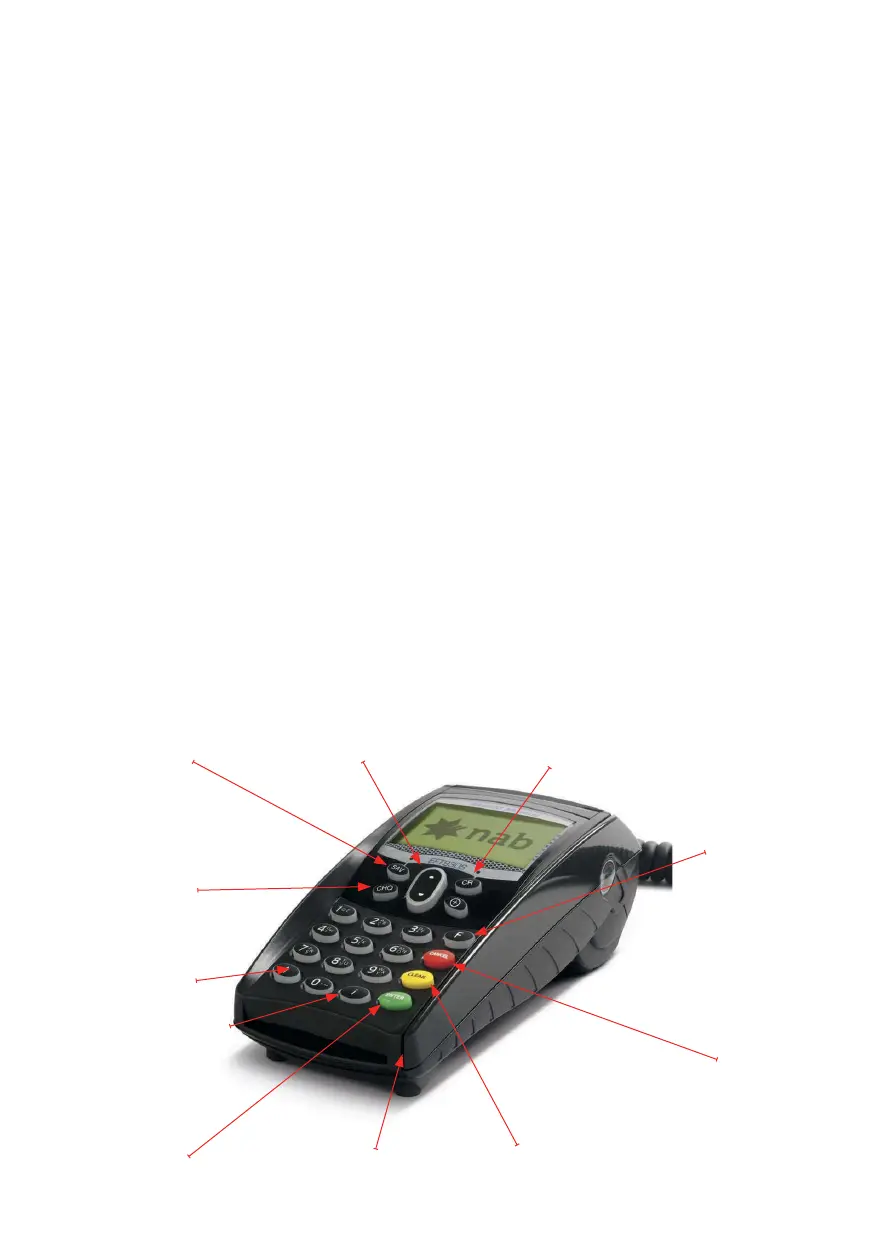
Before you start
Savings Key
Cheque Key
Scroll Key Credit Key
Function Key
Cancel Key
Clear KeyEnter Key
Information Key
Paper Feed Key
Card Swipe
About your NAB Integrated Terminal
Before you begin the installation of your NAB Integrated terminal, you should ensure you
have the following:
• A NAB Integrated EFTPOS terminal
• An active Telstra SIM within the terminal.
• A paper roll loaded in the terminal.
• Checked with your POS vendor that your POS is running the correct version
of PC-EFTPOS software.
• A serial (RS232) to USB adaptor if your POS does not have a COM port available
for use (optional).
• A P66/P67 modem, Argent, or PCEFTPOS Gateway connection. If the site is using
a dial-up service a P66/P67 is only required if the site is installing more than one
EFTPOS terminal.
• The latest PCEFTPOS installation CD (alternatively, latest software can be downloaded
from www.pceftpos.com.au/les/releasecd).
• Terminal and Merchant IDs (per lane) supplied by the bank.
• If the site is using an Argent Line instead of a P66/P67 modem, then a POS-AME (also
known as an Argent Terminal ID or Tran$end ID) supplied by Telstra is also required.
• Congured Argent Line with Host addressing template (also known as Application Code)
of NABINT.



 To Next Page