EN /
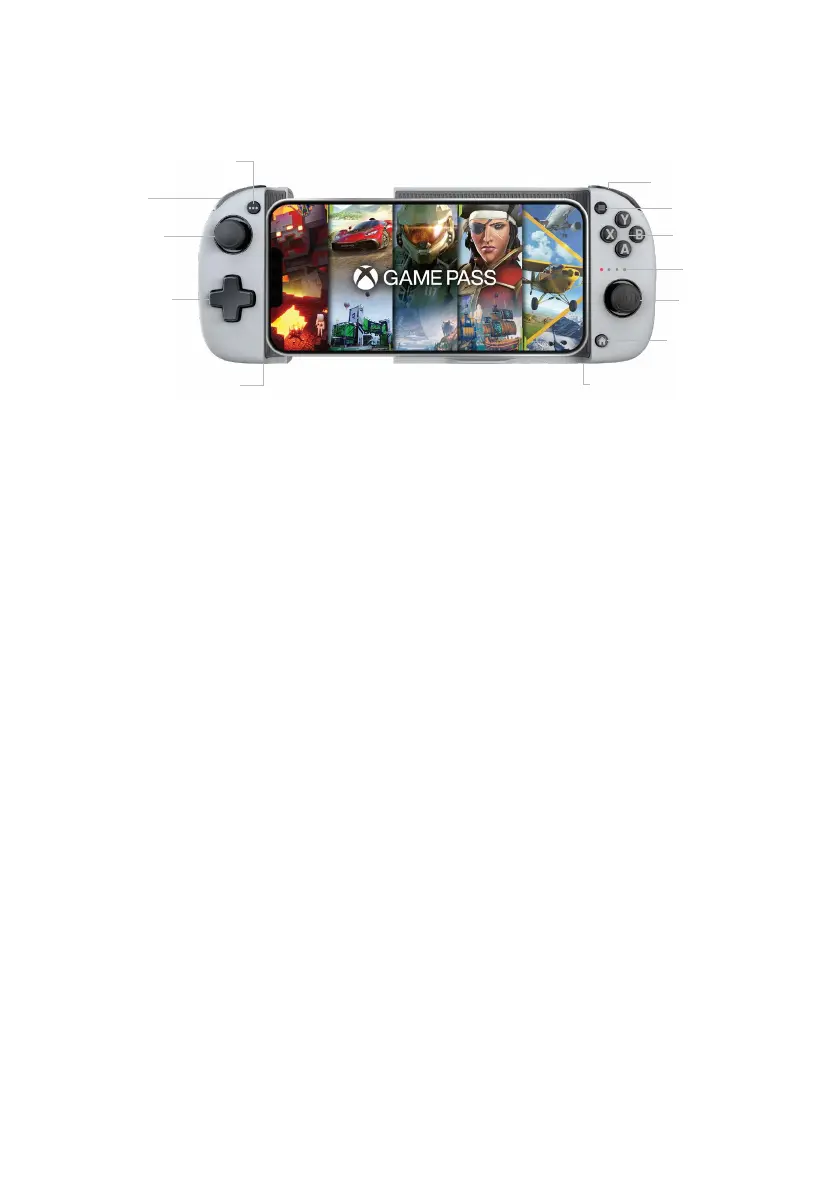
I Control elements
R1/R2
Options button
Left joystick
USB-C charging port
Bluetooth sync button
Right joystick
Status LED
Action buttons
Menu button
Home button
D-pad
L1/L2
I Turning the controller on/off
To turn on the controller, simply press the Home button, and the controller will connect
to the last iPhone® it was synced with.
To turn off the controller, simply hold down the Home button for 6 seconds.
Please note: the controller turns off after 15 minutes of inactivity to save battery power.
I First start-up of the controller
Turn on the controller, and it will go straight into pairing mode. All 4 LEDs should flash
at the same time.
Go to the Bluetooth® menu on your iPhone® and start a Bluetooth® device
search.
On your iPhone®, you should see the controller appear under the name ‘MG-X MFi’,
select it and wait until the controller is in the list of paired devices.
I Syncing your iPhone® with the Nacon MG-X controller
Go to the Bluetooth® menu on your iPhone® and start a Bluetooth® device
search.
Press the Home button on your controller, the status LEDs should light up one by one.
Press and hold the Bluetooth® button on the lower right-hand side for 2 seconds to
initiate pairing. All 4 LEDs should flash at the same time.
On your iPhone®, you should see the controller appear under the name ‘MG-X MFi’,
select it and wait until the controller is in the list of paired devices.
The controller can store up to 5 devices. It will always try to connect to the most recent
device rst.




 To Next Page