EN /
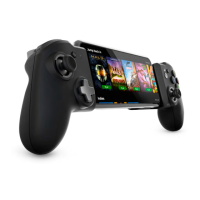
The Nacon MG-X controller is compatible with games in the App Store that support
controllers. To nd out if the game you wish to play supports the MG-X controller, please
refer to the game’s page in the Apple App Store and look for the controller logo in the
line where the game’s rating is located (you will need to scroll from right to left to see it).
I Reconguring my controller buttons
The buttons on the Nacon MG-X controller can be recongured. To do this you need to
go to your phone’s options.
Example on iOS 15: go to: Settings/General/Controller/Custom controls and select the
button(s) you wish to change. You can restore the default values at any time by clicking
on the ‘Restore default values’ button.
Please note: This option is only supported by the Apple® phone system, and Nacon® is not responsible for the
availability or removal of this option.
I Additional functions of the Options button
In your iPhone® menus, you can assign functions to the Options button on the Nacon
MG-X controller and provide quick access to the items listed below via a double tap or
long press:
- Take a screenshot
- Start/stop recording
- Capture a highlight
Example on iOS 15: go to: Settings/ General/ Controller/ Custom Controls and scroll
down the page to nd the ‘SHARING GESTURES’ section, then set up the desired quick
action.
Please note: This option is only supported by the Apple® phone system, and Nacon® is not responsible for the
availability or removal of this option.
I Mobile application
The Nacon MG-X controller can be connected to the mobile application that can be
downloaded from the phone’s App Store. To do this, look for the mobile application:
‘MG-X Series’. It will allow you to update your controller and much more!
I Positioning your iPhone®
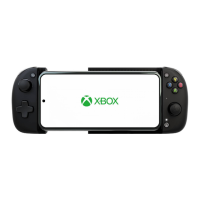
When using your iPhone® with the Nacon MG-X controller, please place your phone in
the dedicated slot to secure your device.
Please note: If your phone has a case, it may keep your phone from correctly tting into the dedicated slot. In this
case, to keep your phone from falling out, it is best that you remove your phone case.
Warning: Please be careful not to pinch your ngers in the sliding system when removing
your iPhone® from the Nacon MG-X.



 To Next Page