EasyManua.ls Logo

NAD 1700 - AM Alignment Procedures; AM Oscillator Adjustment; AM Antenna and IF Alignment; AM Signal Meter Calibration

NAD 1700
22 pages
Print Icon
To Next Page IconTo Next Page
To Previous Page IconTo Previous Page
Loading...
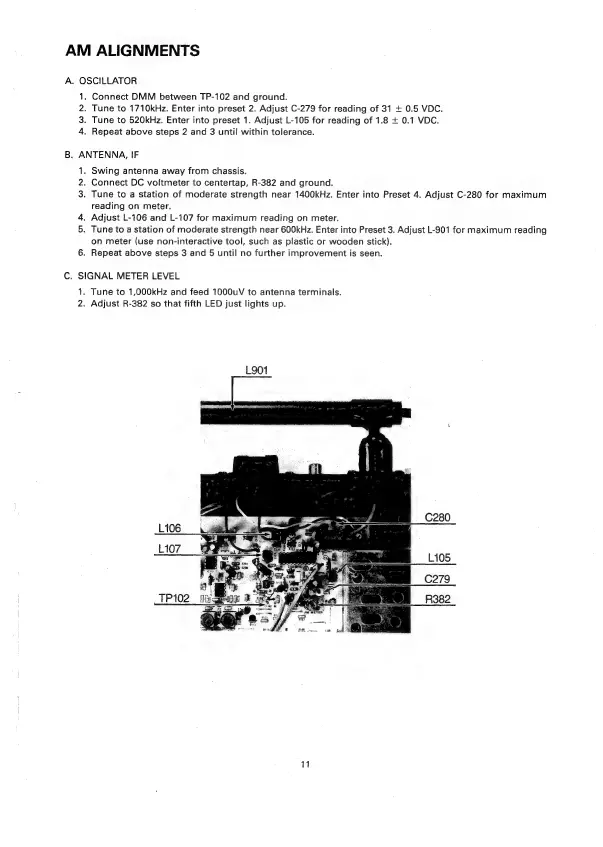
AM
ALIGNMENTS
A.
OSCILLATOR
1.
Connect
DMM
between
TP-102
and
ground.
2.
Tune
to
1710kHz.
Enter
into
preset
2.
Adjust
C-279
for
reading
of 31
+
0.5
VDC.
3.
Tune
to
520kHz.
Enter
into
preset
1.
Adjust
L-105
for
reading
of
1.8
+
0.1
VDC.
4.
Repeat
above
steps
2
and
3
until
within
tolerance.
B.
ANTENNA,
IF
1.
Swing
antenna
away
from
chassis.
2.
Connect
DC
voltmeter
to
centertap,
R-382
and
ground.
3.
Tune
to
a
station
of
moderate
strength
near
1400kHz.
Enter
into
Preset
4.
Adjust
C-280
for
maximum
reading
on
meter.
4.
Adjust
L-106
and
L-107
for
maximum
reading
on
meter.
5.
Tune
to
a
station
of
moderate
strength
near
600kHz.
Enter
into
Preset
3.
Adjust
L-901
for
maximum
reading
on
meter
(use
non-interactive
tool,
such
as
plastic
or
wooden
stick).
6.
Repeat
above
steps
3
and
5
until
no
further
improvement
is
seen.
C.
SIGNAL
METER
LEVEL
1.
Tune
to
1,000kHz
and
feed
1000uV
to
antenna
terminals.
2.
Adjust
R-382
so
that
fifth
LED
just
lights
up.
L901

Related product manuals