GB
8
TROUBLESHOOTING
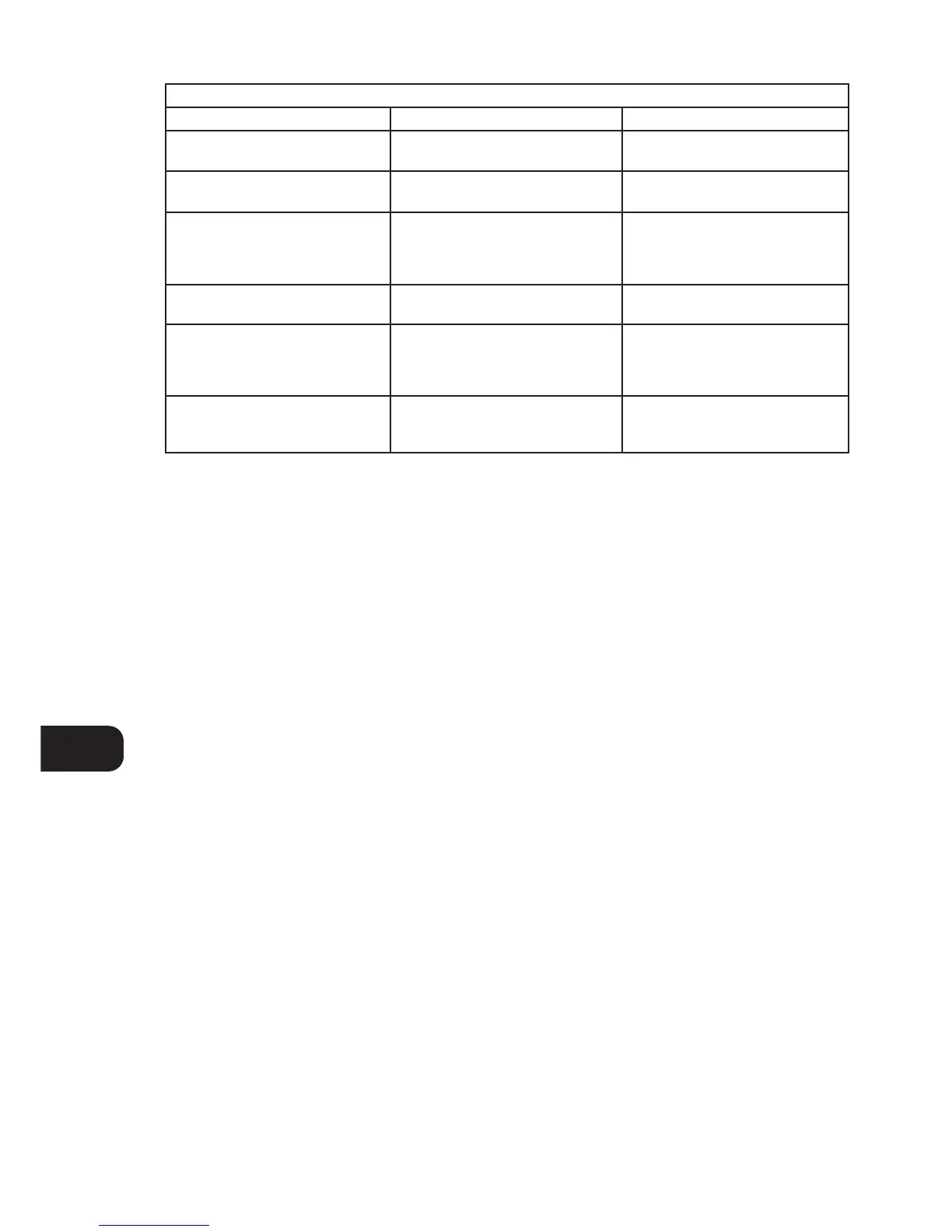
NO POWER WHEN THE POWER BUTTON
IS SET TO ON
• Poor or no power plug connection at
the AC outlet
• Insert the power plug firmly into the AC
outlet.
SYMPTOM POSSIBLE CAUSE SOLUTION
DISC PLAY DOES NOT START • The disc is loaded upside down
• The disc is too dirty
• Reload the disc with the label side UP
• Clean the disc
NO SOUND • Incorrect audio cable connections
• Incorrect amplifier/receiver operation
• Connect the CD player to the
amplifier/receiver correctly
• Make sure that the input selector on
your amplifier or receiver is set to CD
SOUND SKIPS • The CD player is subject to vibration or
physical shock from external sources
• Change the installation location
REMOTE CONTROL DOES NOT WORK • Batteries in Remote Control handset
have expired
• Object obscuring remote sensor
on the player
• Replace batteries
• Remove any objects directly in front of
the player
A “HUMMING” SOUND CAN BE HEARD • Loose cable connections • Check the cable connections,
particularly the phono connecting
cables



 To Next Page