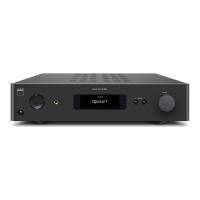
The NAD M51 Direct Digital DAC is a high-performance audio component designed to convert digital audio signals into analog sound with exceptional accuracy and clarity. It embodies NAD's "Music First" design philosophy, aiming to deliver audiophile-quality music listening for years to come.
Function Description
At its core, the M51 is a Direct Digital DAC, utilizing a powerful processing engine that operates at a very high speed and with greater accuracy than typical D-to-A converters. It resamples incoming PCM (pulse code modulated) signals and converts them to PWM (pulse width modulation) at a sampling rate of 844 kHz. This conversion process is crucial as it completely eliminates any jitter present in the incoming signal. Furthermore, the M51's high-speed clock and mathematically precise reconstruction filters ensure that the resulting audio signal is entirely free of digital artifacts like ringing.
The M51 serves as a central hub for various digital audio sources. It accepts inputs from professional audio sources like SACD/CD players or processors via its AES/EBU XLR connector, which is particularly recommended for high-end sources with higher sampling rates (176kHz and 192kHz). Standard digital audio sources such as CD, DVD, or BD players, digital cable boxes, and digital tuners can be connected using the coaxial and optical S/PDIF inputs. For computer audio streaming, the M51 features an asynchronous Type B USB input, allowing direct streaming of 24/192 content from a PC, MAC, or NAS. To enable computer audio streaming, a specific "NAD USB Audio driver" must be installed, which is available for download from the NAD website. The M51 also includes two HDMI inputs (HDMI 1, HDMI 2) and an HDMI Video Out, which function as direct pass-through connections for source components like BD/DVD players or HDTV satellite/cable boxes to a HDTV or projector.
For analog output, the M51 provides both unbalanced RCA and balanced XLR connectors, allowing connection to a wide range of receivers, amplifiers, and professional audio amplifiers.
Usage Features
The M51 offers a user-friendly interface with several features for convenient operation. The front panel includes a Standby button to switch the unit ON from standby mode and back, indicated by an amber or blue Standby LED. A Vacuum Fluorescent Display (VFD) provides visual information about the current source, its sampling rate (if a connected source is detected), and other M51 functions, settings, and indicators. An "Unlock" message is displayed if no source input is connected to the selected source. An Input button allows users to cycle through active sources: AES/EBU, Coaxial, Optical, USB, HDMI 1, and HDMI 2.
Remote control functionality is provided via the M50 remote control. The remote sensor on the front panel allows for reliable infrared communication within a distance of approximately 23 feet (7 meters) and an angle of about 30 degrees in each direction. The M50 remote control features buttons for power ON/OFF, direct source selection (AES/EBU, HDMI 1, COAX, USB, HDMI 2, OPT), and access to setup menus. The SETUP button brings up the Volume Setup menu, and the POLAR. button accesses Polarity settings. The DIM button allows adjustment of the VFD brightness through five levels. The DISPLAY button is used for renaming sources. Navigation through menus and lists is done using directional buttons, and ENTER confirms selections.
The M51's volume control function is configurable through the "Volume Setup" menu, offering "Fixed" or "Variable" settings. In "Fixed" mode, the audio output level is fixed, and the M51's volume control is bypassed, with a desired preset dB level configurable. In this mode, the remote control's volume buttons are disabled, and volume adjustment is handled by the linked amplifier. In "Variable" mode, the volume level can be directly adjusted using the remote control's volume buttons.
The M51 also allows for compensation of recordings with reversed polarity, offering "Positive" (default) and "Reversed" settings. Source inputs can be renamed with up to 16 characters for personalization, a process guided by the remote control and displayed on the VFD.
For integration into advanced control systems, the M51 includes an RS-232 port, making it compatible with AMX and Crestron systems. Information on RS232 Protocol documents and PC interface programs is available on the NAD website. A +12V Trigger Out allows the M51 to control external equipment with a +12V trigger input, outputting 12V when ON and 0V when OFF or in standby. Conversely, a +12V Trigger In allows compatible devices to switch the M51 ON remotely from standby mode. An IR In port enables control of the M51 from a remote location via an IR repeater or another component's IR output.
Maintenance Features
The M51 is designed with safety and longevity in mind. Important safety instructions emphasize proper placement for ventilation, avoiding exposure to water or moisture, and protecting power cords. The unit should be cleaned only with a dry cloth. In case of damage or malfunction, servicing should be referred to qualified service personnel.
The M51 supports software updates via its UPGRADE USB input, allowing it to stay current with technology trends. These updates should only be implemented by authorized NAD distributors or service centers.
Troubleshooting guidance is provided for common issues such as no USB audio, remote control unresponsiveness, or dim VFD. Solutions include installing the correct USB audio driver, checking PC audio settings, ensuring proper remote control battery insertion, and clearing obstructions to the IR sensor.
For situations requiring a complete reset, the M51 can be restored to its factory default settings by following a specific procedure involving the front panel INPUT button and rear panel POWER switch. This process clears all user-defined settings.
The M51 is supplied with two detachable mains power cords to accommodate different regional requirements. Users are advised to firmly connect the power cord to the M51's AC Mains input socket before plugging it into the mains power source, and to disconnect from the mains power source first before disconnecting from the M51. For extended periods of non-use, the rear panel POWER switch should be turned off.
The packaging of the M51 should be retained for safe transport or future relocation, as it is designed to protect the component from damage. Environmental protection notes encourage proper disposal of the product and its batteries at designated collection points for recycling, emphasizing the importance of minimizing environmental impact.


 To Next Page

 General
 Weight and Dimensions