GB
7
If the blue LED indicator lights up continuously, switch the Power Off.
When the output stage cools, relays will automatically re-connect the
speakers, and normal operation can be resumed. In most cases a
very slight reduction in volume level will prevent further interruptions.
If the protection relays interrupt the sound frequently, several
possible causes should be considered: A loose strand of wire causing
a partial short-circuit between speaker terminals, or continuous high-
power operation into a very low impedance in the Bridged mode, or
any obstruction of the free flow of air that is needed to ventilate the
amplifier and dissipate its heat.
If the protection system interrupts the sound even when the amplifier
is cool, return the amplifier to your NAD dealer for service. The
protection relays may be disengaging to protect your speakers from a
circuit fault, such as an improper DC voltage at the speaker terminals.
4. SOFT CLIPPING INDICATOR
This LED glows when the Soft Clipping switch (on the rear panel) is ON.
5. BRIDGE MODE INDICATOR
This LED glows when the Bridging switch (on the rear panel) is set to
ON (STEREO).
TROUBLESHOOTING
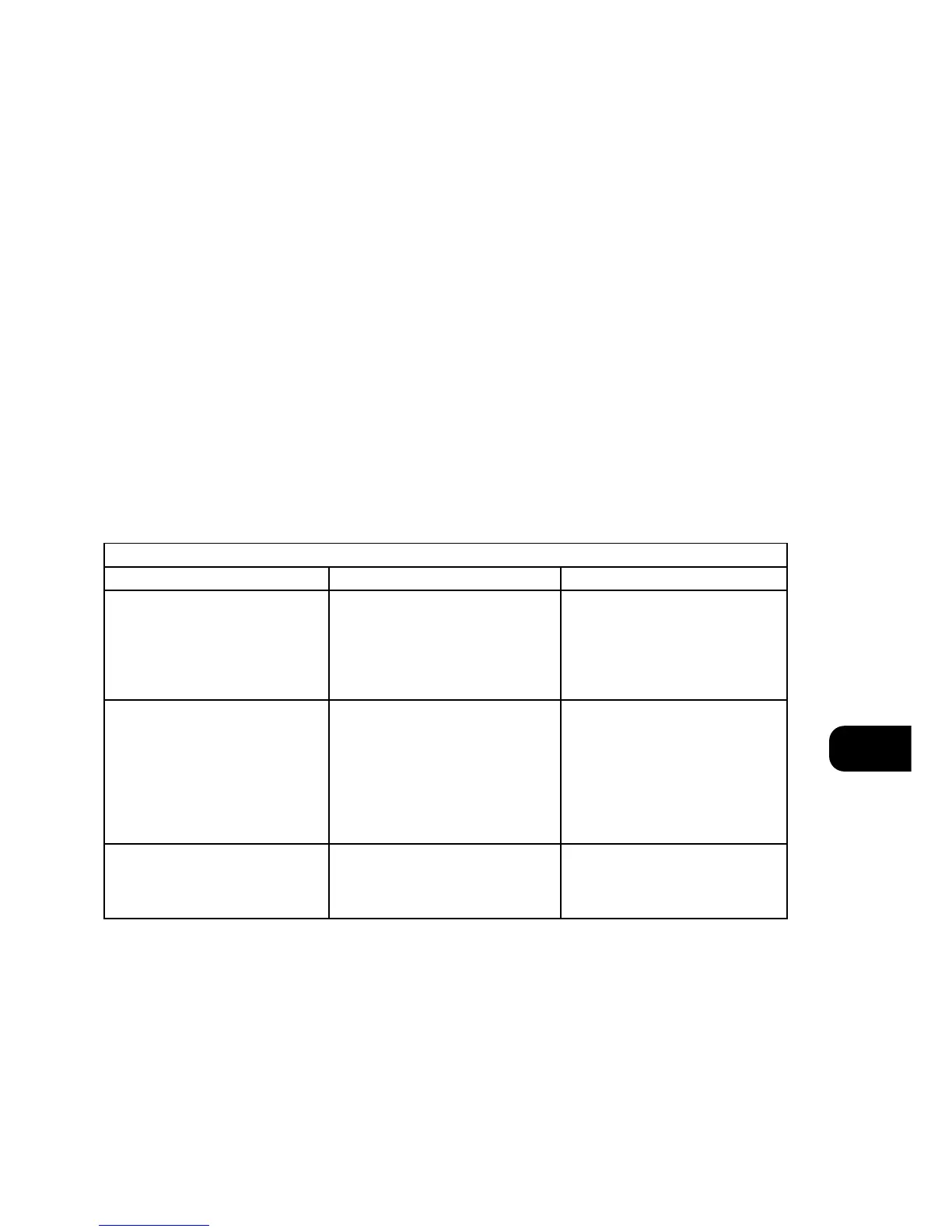
NO SOUND • Power not on
• The Protection mode is engaged
• Check if AC Mains cable is plugged in and
power switched on
• Turn amplifier off, make sure ventilation
slots on top and bottom of amplifier are
not blocked. After amplifier has cooled
down, turn the amplifier on
Problem Cause Solution
NO SOUND IN ONE CHANNEL • Speaker cable pulled loose
• Input cable pulled loose or making poor
contact in socket
• Short-circuit or broken wire in a defective
input cable
• Check all connections both at the
speakers and at the amplifier
• Switch the amplifier off, rotate RCA
phono input sockets to restore good
contact. Check the connection at the
preamplifier end of the signal cable
• Switch the S200 off, check and replace
cables if necessary
WEAK BASS/POOR STEREO IMAGING • Loudspeakers wired out of phase
• Bridging switch set to ON (MONO) while
speakers are connected for stereo operation
• Swap connections at the back of ONE
speaker
• Re-set the Bridging switch to Off (STEREO)


 To Next Page