D
D
a
a
c
c
m
m
e
e
n
n
u
u
s
s
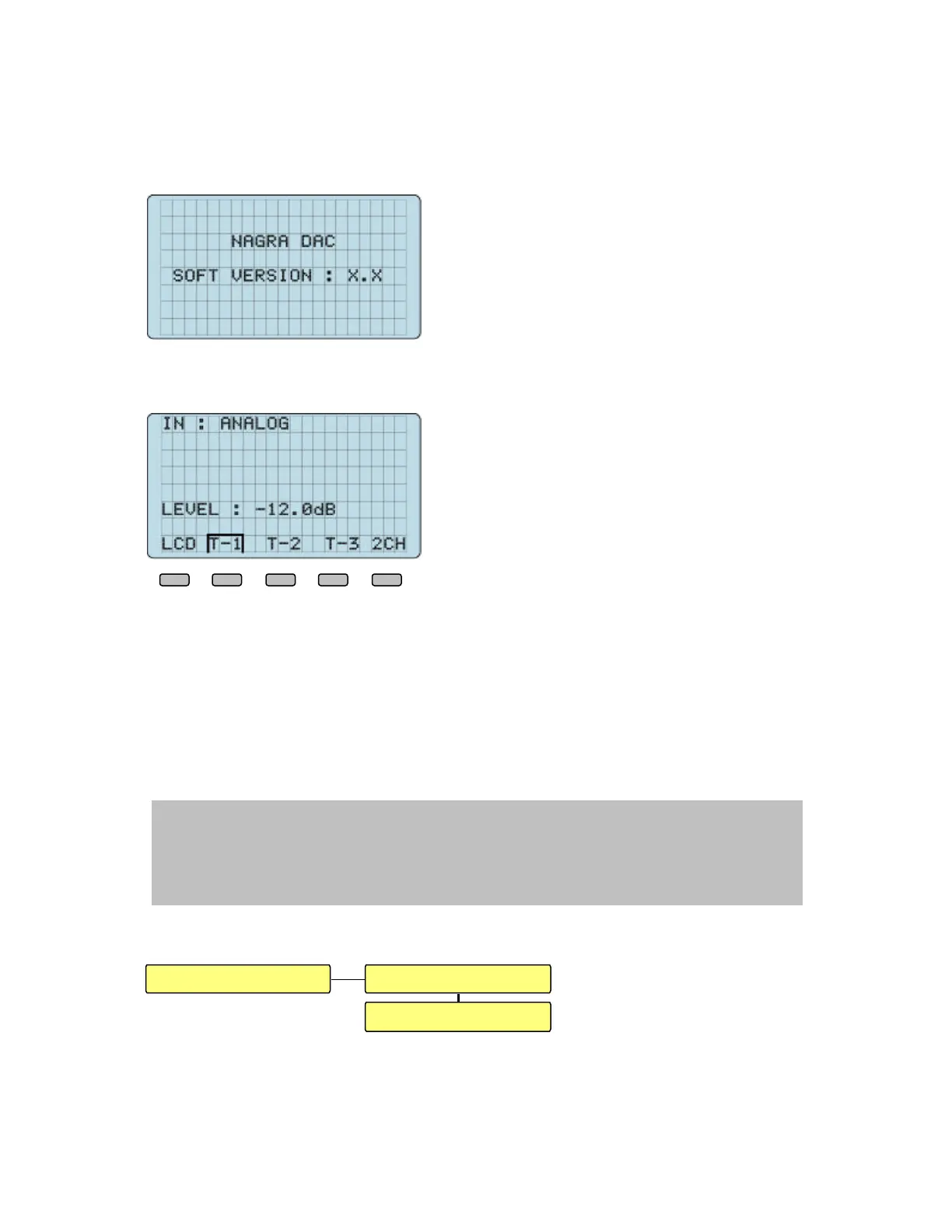
Display at power on for a few seconds: It shows
the software version of the machine.
Second display or main display (in the case that the machine was reset to default factory
settings):
In this case, the machine selected “A”, the first
input or analog input.
The main output level is by default factory
settings –12.0 dB.
The text on the lower line corresponds to the 5 function keys (F1 to F5)
“LCD” stands for the LCD display. If “F1” is pressed and hold, a new display will come
up and it becomes possible to adjust the contrast of the display. This will be explained
later in the manual.
“T-1”, “T-2”, “T-3” are the 3 templates available on the machine. They give the
possibility to select directly by one button a fully configured setup as well as the
designated input.
All those functions will be explained later in the manual.
IMPORTANT NOTE:
When scrolling through the menus, a time out counter will start automatically and will
return any selected position to the main display. The time counter returns to main display
if during 30 seconds no menu key was pressed.
1 DATA STREAM DETAILS
NOTE: In the following explanations, all text written in bold blue ( example: DATA
STREAM DETAILS) is directly showing a sub menu or text included on the same
display.
F1 F2 F3 F4 F5
DATA STREAM DETAILS FMT : LINEAR PCM
SMP FREQ: 48 kHz
Dac menus


 To Next Page