Override timer
Standby timer
Discharge Air Temp
MAXF
Max. Fan Speed (%)
Calibration
Auto. Occ. Mode
Set Password 1
Set Password 2
Min, Cool Flow
Max. Cool Flow
Auxillary airflow
Max. Heat Flow
Min. Heat Flow
AdvancedSetpoints and limits
Min. Fan Speed (%)
Dual Minimum CFM
Primary K Factor
Secondary K Factor
No/Stg/Par
No/Ser/Par
CCW/CW
Unoccupied Heating
Cool Setpoint
Heat Setpoint
Occupied Cooling
Occupied Heating
Changeover
Unoccupied Cooling
Standby Differential
Temp. setpoints
Conguration
Optional
Differential
Restore
BACnet instance
BACnet MAC
Baud Rate
Primary
Measured Max. Flow
Measured Min. Flow
Secondary
End conguration
Measured Max. Flow
Measured Min. Flow
End conguration
End conguration
English/Metric
IOM-EZVAVQSIG
Date: 9-2015 Supersedes: NEW
Page 4 of 4
Quick Start Configuration Guide – EZvav Sensors & Controllers
Use an STE-8001W36 or STE-8201W36 sensor
to congure the EZvav controller. If another
type of sensor is installed as the room sensor,
temporarily connect an STE-8001W36 as a
service tool.
To get started:
Press together the up
∆
and down buons to
start conguraon or balancing.
Enter Password 2 if required. New installaons
do not have a password.
Press the up
∆
or down buons to move
between funcons or change values.
Press the set point
buon to choose a
selecon or save a value.
∆
∆
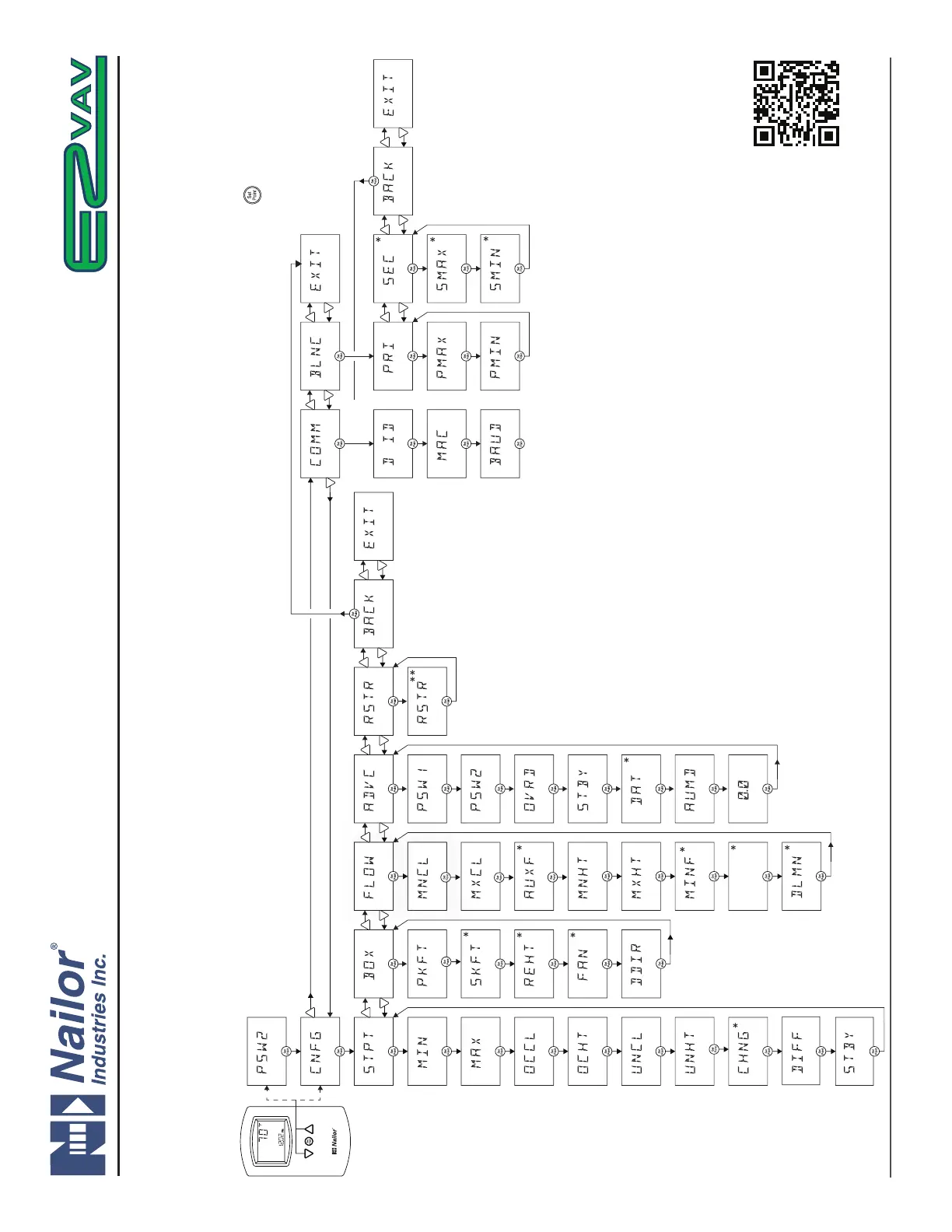
CNFG The main conguraon parameters for the VAV terminal unit.
COMM Set BACnet device instance, MAC address and network baud.
BLNC Set airow balancing parameters. Only the PRI (primary) menu
is used for single duct VAV Terminal Units.
STPT Enter temperature set point and limits.
BOX Set up reheat, fan operaon and basic terminal unit funcons.
FLOW Set airow set point and limits.
ADVC Enter passwords and enable model specic features.
RSTR Restore to factory sengs.
For complete details on controller conguraon,
download IOM “IOM-EZVAVINST” from Nailor website.
* Not used for all models
** Select English (factory seng) or Metric before seng other parameters.
www.nailor.com
Nailor reserves the right to change any information concerning product or specification without notice or obligation.



 To Next Page