E4
CD555
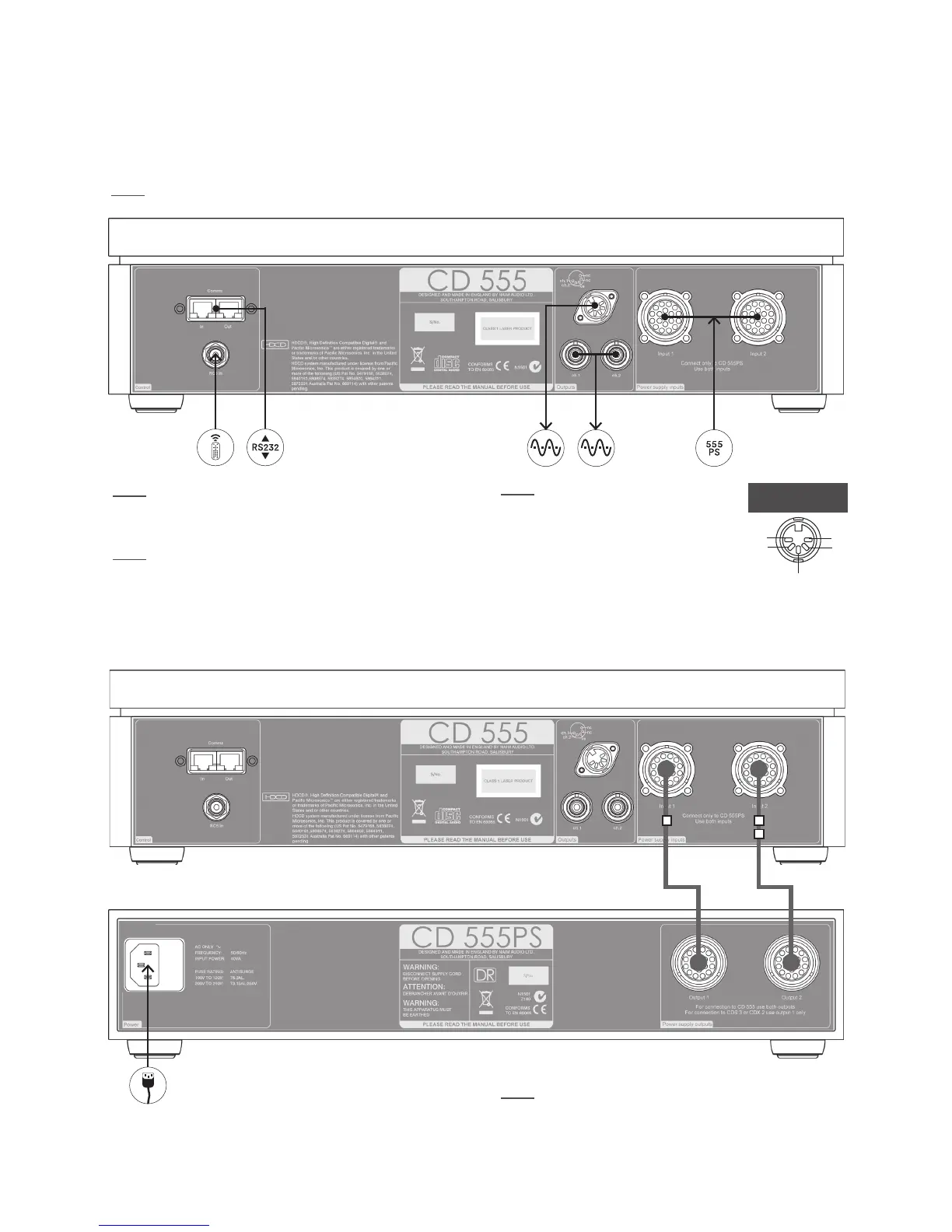
5. CD555 Connections
5.1 Rear Panel
Note: Icon descriptions can be found in Section 19.
Note: The RC5 Input is intended to accept external
control signals for multi-room applications. Contact your
dealer or Naim Audio directly for further information.
Note: The optional RJ45 socket Comms Interface
can provide external control of the player in custom
installations. Contact your dealer or Naim Audio directly
for further information.
ch1
ch2
-ve
nc
nc
DIN output
CD Burndy
Cable 1
CD Burndy
Cable 2
Note: Two dierent Burndy cables are required to
connect the CD555 to the CD 555PS. Cable 1, identied
by a single band on its direction marker, should be used
with Sockets 1, and Cable 2, identied by a double band
on its direction marker, should be used with Sockets 2.
5.2 CD555 Connected to CD 555PS
Note: RCA phono and DIN output
sockets should not be connected
simultaneously.



 To Next Page