44
EN
3.1 Connecting your NSC 222 to the NAP 250 power amp
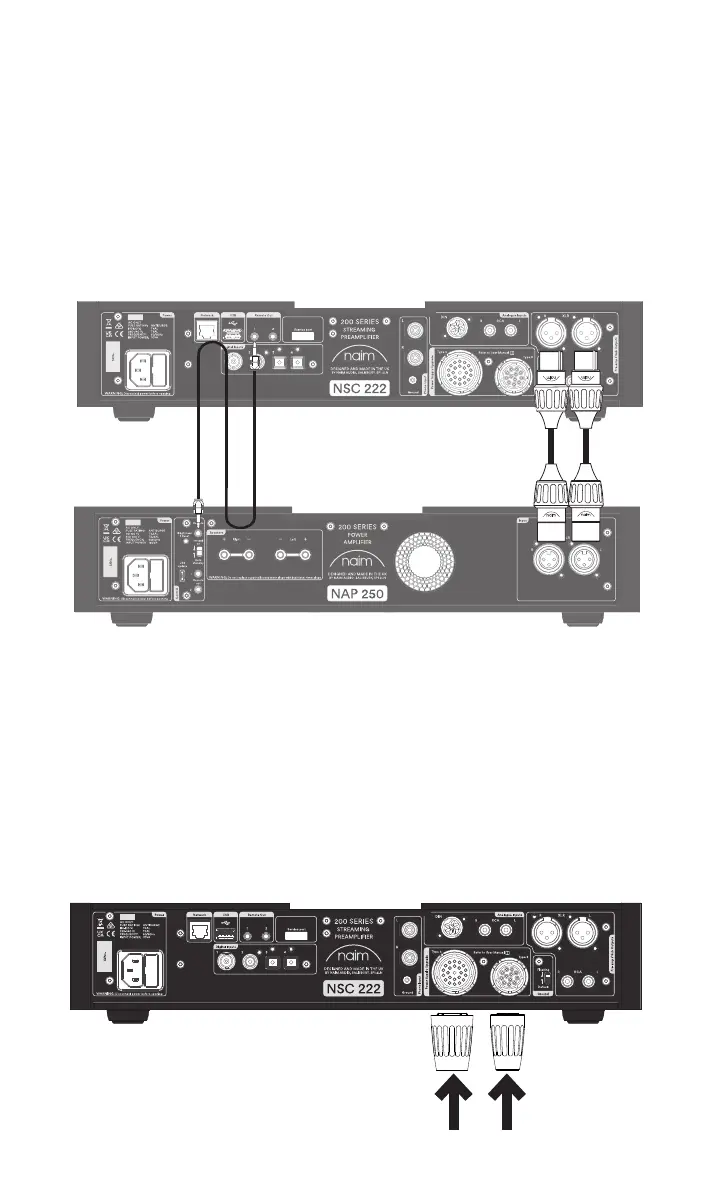
Connect two XLR cables (supplied with the NAP 250) from the balanced XLR outputs of
NSC 222 to the balanced input of the NAP 250. Ensure the cables are channel-matched:
the pre-amplier left output connected to the power amplier left input and the same for
the right. Please ensure that the XLR plugs are inserted correctly, which is achieve with the
Naim logo on the plug facing upwards.
Connect the system automation cable (supplied with the NAP 250) to the
NSC 222 Remote Out terminal and the Remote In terminal on the NAP 250.
3.2 Powering up
Once you have connected your NSC 222 to a power amplier, and connected the
loudspeakers, there are just a few more, simple steps to take before you can power up
your NSC 222 and start streaming.
Connect the two supplied link plugs to the NSC 222 power supply upgrade sockets.
If using a wired network connect a cable between the RJ45 socket and the router or
switch.



 To Next Page