5
3. 2.4G and Bluetooth Remote Control
The FS series has a built-in 2.4Ghz receiver, enabling it to be remotely controlled by remote controller or by APP via
the 2.4G transfer device. It also has built-in bluetooth function to connect with bluetooth for more control options.
Note: 2.4G remote controller or 2.4G transfer device sold separately.
(See separate instructions for remote controller or 2.4G transfer device.)
2. DIM setting:
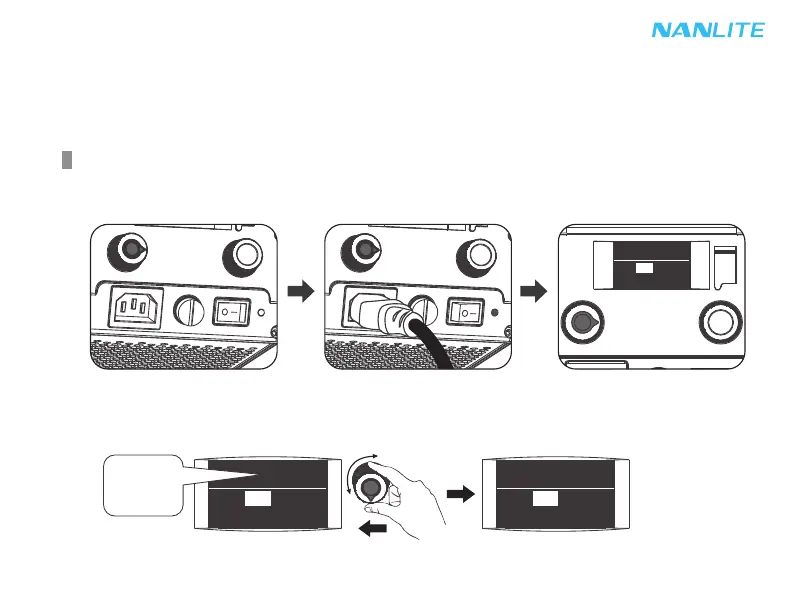
Rotate "left knob", clockwise to increase brightness while counterclockwise to reduce brightness, the display shows
the percentage of brightness, the DIM range is from 0%-100%.
CH:
512
0%
FX: OFF
100%
CH: 512
FX: OFF
0%
.
.
.
100%
1. Make sure the power switch is in the "OFF" position, then connect the fixture to the adapter with power cable. Then
turn on the power switch, if the indicator is nomally on, the screen will display the relevant information for the fixture.
Operating Instructions
CH:
512
100%
FX: OFF



 To Next Page
 Loading...