Need help?
Do you have a question about the NANLITE FS-300B and is the answer not in the manual?
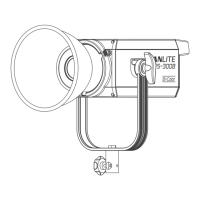
For updating the firmware.
For selecting options and adjusting color temperature.
For switching between EFFECT, CCT, and MENU modes.
For switching the fixture on or off.
Adjust brightness (DIM) and color temperature (CCT) using the left and right knobs.
Configure built-in effects: CCT LOOP, INT LOOP, FLASH, PULSE, STORM, TV, PAPARAZZI, CANDLE/FIRE, BAD BULB, FIREWORK, EXPLOSION, WELDING.
Turn the cooling fan ON or OFF, affecting maximum output.
Update the fixture's firmware using a USB drive.
 General
| Bulb type | LED |
|---|---|
| Light color | White |
| Total power | 350 W |
| Bulb lifetime | - h |
| Number of bulbs | - bulb(s) |
| Beam angle (max) | 120 ° |
| Fitting/cap type | - |
| Color temperature (max) | 6500 K |
| Color temperature (min) | 2700 K |
| Adjustable color temperature | Yes |
| Product color | Black |
| AC input voltage | 100 - 240 V |
| AC input frequency | 50 - 60 Hz |
| Country of origin | China |
 Weight and Dimensions
| Depth | 265 mm |
|---|---|
| Width | 430 mm |
| Height | 250 mm |
| Weight | 4000 g |
| Height (min) | 123 mm |

 To Next Page