Two-way-talk
Two-way-talk
You can use the talk-back sign button on the parent unit to talk
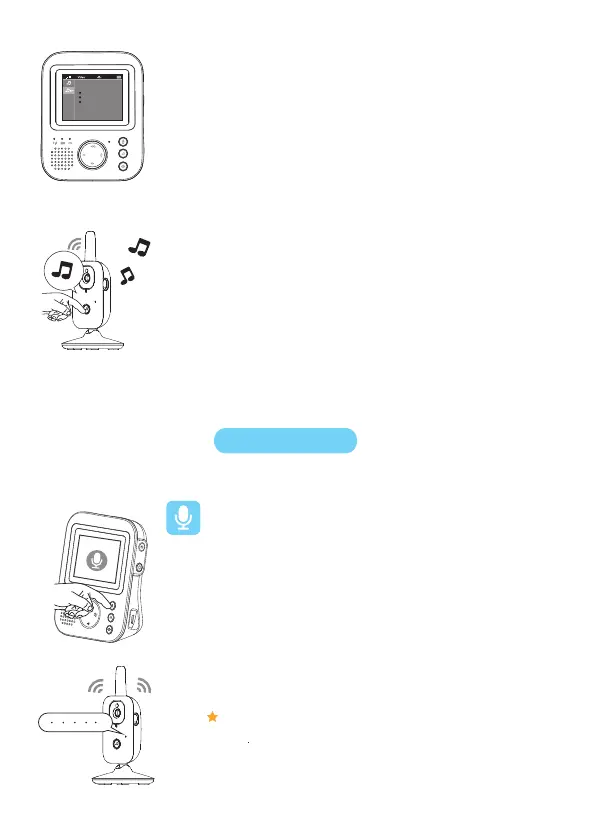
Lullaby volume
1. Press the lullaby button on the parent unit to open the menu for lullabies.
Press the left part of the control button and then press the bottom of the
control button to select the volume options of the lullaby menu.
Press the right part of the control button to access the lullaby volume levels.
2. Press the top or bottom part of the control button to adjust the volume.
3. To stop the lullaby, press the lullaby button on the parent unit and pause
the song that is currently playing by pressing the right part of the control
button one more time.
to your baby.
Press and hold the “ talk-back ” button
Speak clearly within a distance of 15-30 cm/0.5-1 ft.
While talking, you can see the “ talk-back ” on the monitor
1
2.
3.
Note: When the “ talk-back ” button is pressed, the parent unit cannot
process sounds coming from the baby unit.
To activate the lullaby feature from the baby unit, press the lullaby
on/off button on the baby unit.
The latest lullaby selected on the parent unit starts to play on the baby
unit and is repeated continuously for approximately 15 minutes.


 To Next Page