20
NARVON SUMMIT
IMPORTANT: AUTOMATIC FUNCTIONS do not work correctly if the control panel time is not set correctly.
The date and time must be congured correctly to work with the AUTOMATIC FUNCTIONS.
Set the clock and date to the current time. See the SETTINGS section on Page 11.
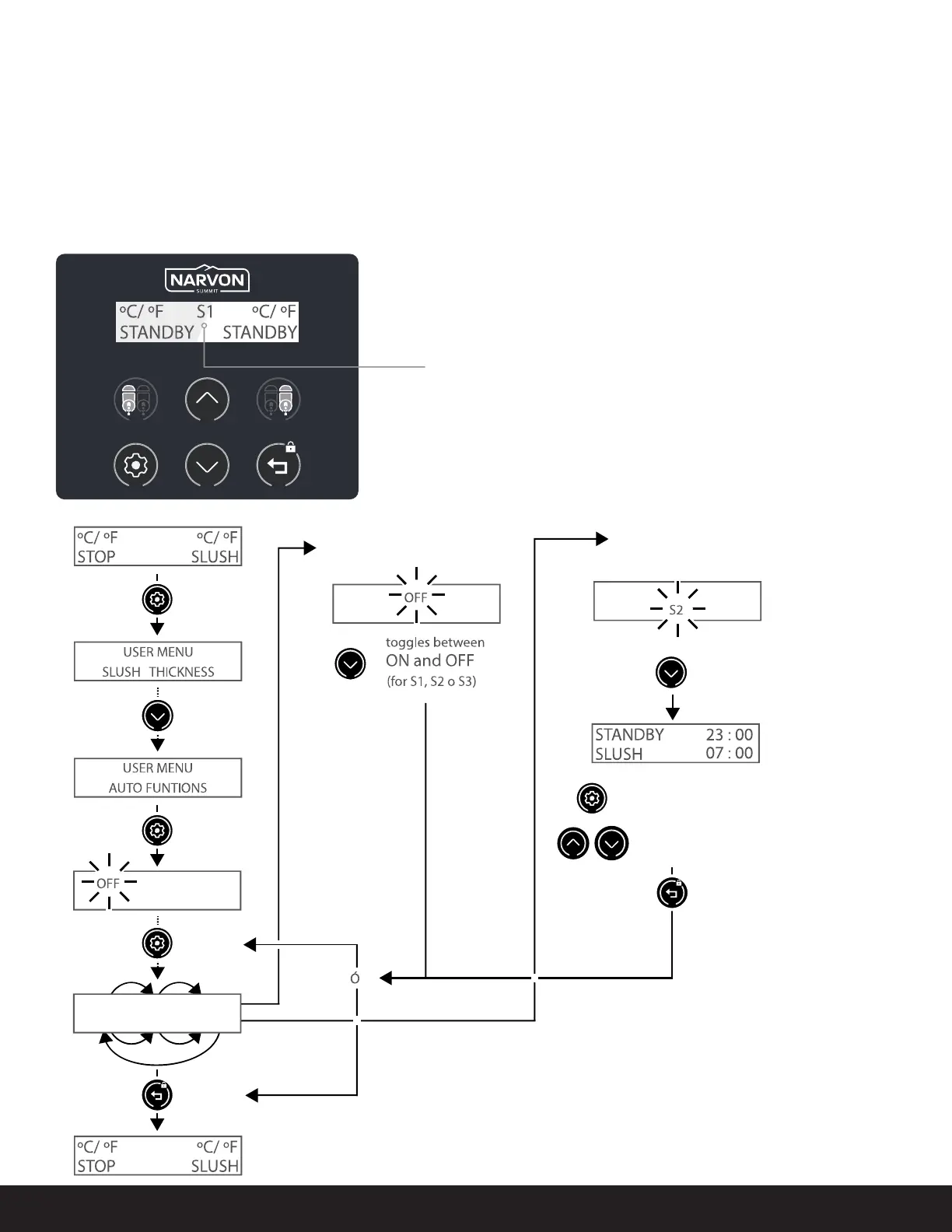
AUTO FUNCTION:
Number of active program (1 to 3)
PROGRAMMING
AUTOMATIC FUNCTIONS
OFF
S
2
S
3
S
1
OFFOFF
OFF
S
2
S
3
S
1
OFF
S
2
S
3
S
1
OFFO FF
S
2
S
3
S
1
OFFO FFOFF
1. Press
and hold.
When ON or OFF ashes:
When S1, S2, S3
(cycle number) ashes:
Press to advance to
DEFROST/STANDBY
and change the time on slush
Time defrost starts
if you need it or
it will start to hail
Select number being changed
(number ashes)
Increases/decreases number setting
Save the changes and exit
(Press twice to exit the
user menu)
2. Press and
release.
4. Press and
release.
5. Press
twice
to exit.
3. Press.



 To Next Page