12
Water Supply:
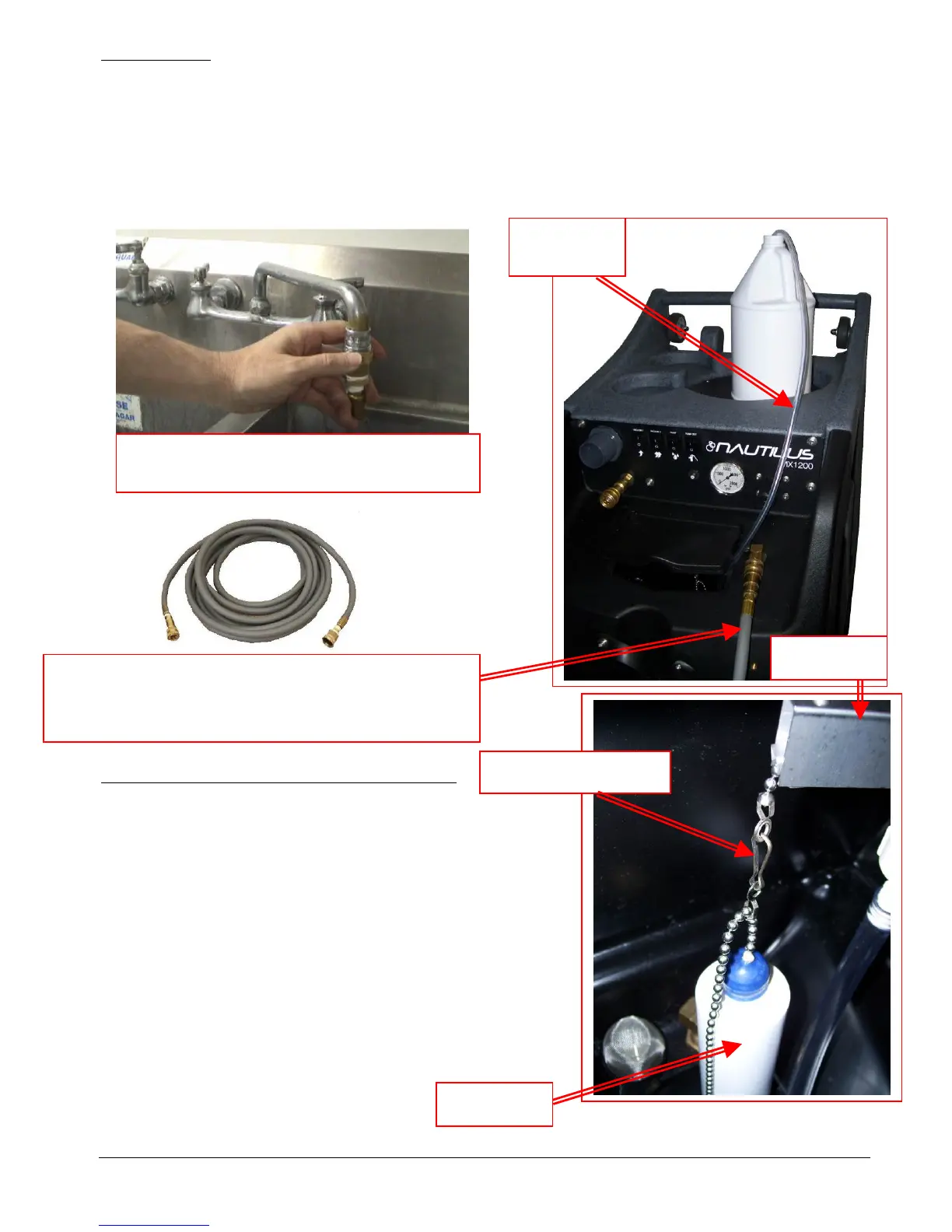
• Once the correct metering tip is in place:
o Connect the Auto-Fill Water Supply Hose to the water inlet (the male quick-connect on the front
of the machine.)
o Connect the other end of the hose to a water faucet, and then turn on the water.
• Hot water can be used as long as the temperature does not exceed 130°F.
• Faucet adapter kits (Hydro-Force item #AX21 & AX22) are available that allow connection to different
types of faucets if needed.
To adjust the water level in the solution tank:
• Turn off the water supply.
• Adjust the length of the chain connecting the float bottle to
the float valve. Unhook the float from the beaded chain on
the valve. Unsnap the hook from the beaded chain on the
float.
Move the bottle down to decrease the water level.
Move the bottle up to increase the water level.
• Snap the back onto the float chain & hook the float back
onto the valve chain.
• Turn the water supply back on.
If the chemical is not drawing, or if the tank is not filling
or is overflowing, refer to the trouble shooting guide, or
contact your distributor for assistance.
Connect the Auto-Fill Water Supply Hose to Solution Inlet
(Male quick connect on the front of the machine.)
3/8” id X 25’ with F Quick Connect & F Garden Hose Fitting
Float Valve
Float Bottle
Connect the Auto-Fill Water Supply Hose to a
faucet and turn on the water
Chemical
Feed Hose
Float Hanger Hook


 To Next Page