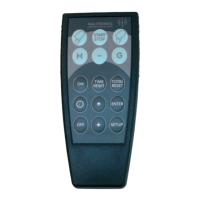
Naucon-1000 test
Description of Naucon-1000
test menus
Revision: 1
Service Menu Tests
To enter the service menu press:
‘Menu’->’Exit Sport’->’General Setup’->Service Menu’->enter code:’1166’.
Browse to page 6/7.
Test menu: This function is used to test the Scoreboard digits, dots and Text displays.
Test 1: When selected, all digits and dots are turned on. If text displays are installed, they
will show the address of each individual text board:
Home team text display = 0 1 2 3 5
Combined team text display = 0 1 2 4 5
Guest team text display = 88 89 90 91 92
Home Sideboard text displays line 1 = 8 9 10
Home Sideboard text displays line 2 = 12 13 14
…
Guest Sideboard text displays line 1 = 136 137 138
Guest Sideboard text displays line 2 = 140 141 142
…
Test 2: When selected, all digits count from 0 to 9. Dots turn on and off, from the bottom up.
The text displays will keep showing the adresses.
Test 3: When selected, groups of digits in the Main Scoreboard are turned on, from the top
down. The text displays will keep showing the adresses.
Test4: When selected each text line at a time will turn all LEDs on for a few seconds followed
by ‘Done’. The digits and Dots will be off.
Test handles: This function is used to test if a control handle is functioning correct.
Test-sheet: When a button is pressed on the control handle, the following numbers appear
in the Test handles box.
Start Game time = 1
Stop Game time = 2
Start/Stop Shot clock time = 3.
Reset Shot clock time = 4.
Shotclock Time2 = 34
Game Horn = 5
9


 To Next Page
 Loading...