5
EN
2. Product Overview
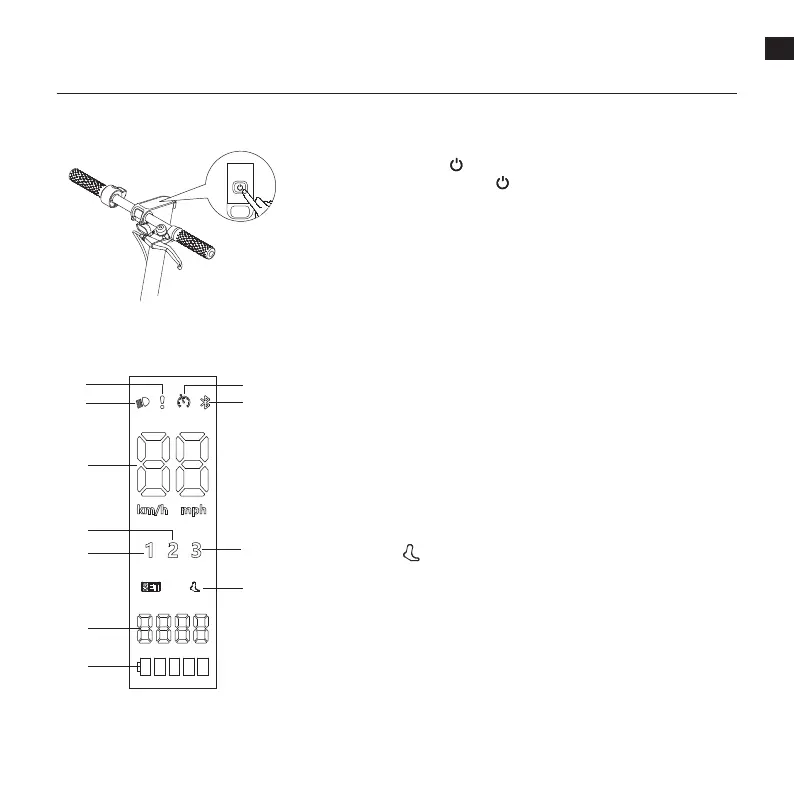
① Headlight State Indicator
② Error Notication: When the wrench icon displays red. it indicates that the
scooter has an error.
③ Cruise Control: The cruise control function is disabled by default and can
be enabled in the app.
④ Bluetooth: When the bluetooth icon is on, it means that the scooter has
been successfully connected to the mobile device.
⑤ Speedmeter: Indicates the current speed.
⑥ Walking Mode:
is for walking mode, and its maximum speed is 6 km/h.
⑦ Fisrt Gear
⑧ Second Gear
⑨ Third Gear
⑩ Total Mileage
⑪
Battery Level: The battery power is indicated by 5 bars, each representing
approximately 20 % of a full battery.
⑪
① ④
⑥
⑤
⑧
⑦
⑩
②
③
⑨
Press and hold the button for 3 seconds to turn the scooter on/o. When
the scooter is on, press the button to turn on/o the headlight and tail
light, and press twice to cycle through the modes.
Power Button
Dashboard


 To Next Page