11
EN
6. Connecting with the NAVEE App
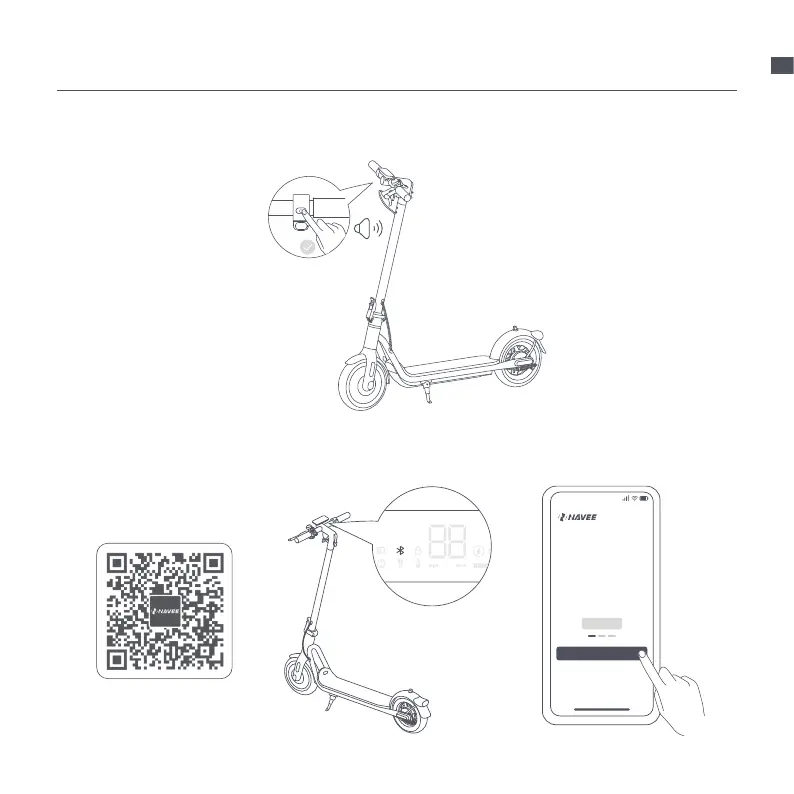
NOTE: For your safely, your new scooter is not activated before binding, and the scooter will keep beeping when turned on
and is limited to 10 km/h. When the scooter is used for the first time, it must be activated via the NAVEE app, and learn how
to ride safely. Once the scooter is activated, the beeping will stop and the speed restriction will be lifted.
1. Scan the QR code to download and
Install the App, and then register/login.
2. Power on the scooter, a blinking
Bluetooth icon indicates the scooter is
waiting for a connection.
3. Open the NAVEE app, click [Bind my
device] and follow the app instructions to
bind the scooter.


 To Next Page