Need help?
Do you have a question about the Navitel MR450 GPS and is the answer not in the manual?
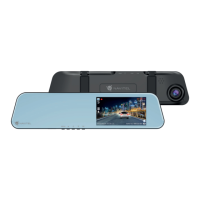
Identifies and describes the various physical buttons, ports, and display elements of the DVR.
Details on the primary camera sensor, resolution, lens, and view angle.
Details on the secondary camera sensor, resolution, and view angle.
Guidance on installing the DVR, including microSD card and mounting.
Instructions for connecting the car charger and powering on the device.
Important safety guidelines for device operation, handling, and environmental factors.
How to turn the device on/off and control the screen display.
Functions of Record, Capture, and Protect file buttons.
Display of speed, time, and proximity alerts for speed cameras.
 General
| Product color | Gray |
|---|---|
| GPS (satellite) | Yes |
| Number of cameras | 2 |
| Main camera resolution | 1920 x 1080 pixels |
| Main camera viewing angle | 160 ° |
| Main camera sensor resolution | 2 MP |
| Image formats supported | JPG |
| Display diagonal | 5.5 \ |
| Bluetooth | No |
| Wi-Fi standards | 802.11b, 802.11g, Wi-Fi 4 (802.11n) |
| Mini-USB ports quantity | 1 |
| Output current | 2.5 A |
| Output voltage | 5 V |
| Battery capacity | 400 mAh |
| Operating voltage | 3.7 V |
| Power source type | Battery, USB |
| Compatible memory cards | MicroSD (TransFlash) |
| Maximum memory card size | 64 GB |
 Weight and Dimensions
| Depth | 39 mm |
|---|---|
| Width | 310 mm |
| Height | 86 mm |
| Weight | 230 g |

 To Next Page