EasyManua.ls Logo

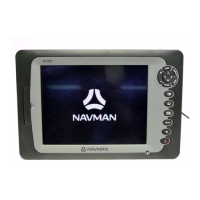
Navman Tracker 5505 - User Manual

Navman Tracker 5505
68 pages
Print Icon
To Next Page IconTo Next Page
Loading...
NAVMAN
w w w . n a v m a n . c o m
Pilot 3380
A U T O P I L O T
w w w . n a v m a n . c o m
Tracker 5505/5605
C H A R T P L O T T E R
Installation and
Operation Manual
www.Busse-Yachtshop.de email: info@busse-yachtshop.de

Table of Contents

Question and Answer IconNeed help?

Do you have a question about the Navman Tracker 5505 and is the answer not in the manual?

Summary

IMPORTANT SAFETY INFORMATION

FCC Statement

Compliance details for digital devices per FCC rules.

Industry Canada

Compliance statement for devices operating under Canadian regulations.

1 Introduction

1-1 Overview

Describes the TRACKER's features, models, and optional sensor dependencies.

2 Basic Operation

2-1 Using the keys

Explains the function of each button on the TRACKER unit.

2-2 Using the menus

Guides on navigating through menus, selecting options, and changing data.

2-3 Turning on and off; auto power

Details on manually powering the unit and auto power settings.

3 Navigation: Chart

3-1 Overview of navigating

Introduces the two main methods of navigating with the TRACKER.

3-2 Chart display

Explains the components and features of the chart display screen.

4 Navigation: Highway display

5 Navigation: Waypoints

5-2 Managing waypoints

Covers the creation, editing, and deletion of waypoints.

6 Navigation: Routes

6-2 Managing routes

Details on creating, editing, deleting, and navigating routes.

7 Satellites

8 Gauges display

9 Data display

10 Fuel functions and display

10-2 Fuel display

How to access and interpret the fuel display showing speed, remaining fuel, and flow.

10-6 Fuel consumption curves

How to create and use curves to analyze engine performance and fuel economy.

14 Setting up the TRACKER

14-1 Setup > System

Settings related to language, night mode, key beep, and auto power off.

14-2 Setup > Chart

Configuration options for chart rotation, palette, map datum, and map shift.

14-3 Setup > GPS

Settings for GPS source, DGPS correction, static navigation, and speed filters.

14-4 Setup > Fuel

Configuration for fuel sensors, engine/tank setup, and fuel flow settings.

14-5 Setup > Track

Options for recording, displaying, and managing boat tracks.

15 Installation

15-3 Installation: The display unit

Guidelines for selecting a mounting position and method for the display.

15-11 Installation: Setup and test

Final steps for setting up the unit and performing a test run.

Appendix B - Troubleshooting

B-1 General Problems

Troubleshooting steps for issues like the unit not turning on or beeping.

B-2 GPS navigation problems

Solutions for GPS fix issues, position inaccuracies, and chart display problems.

B-3 Fuel consumption problems

Troubleshooting tips for inaccurate fuel readings and consumption issues.

Summary

IMPORTANT SAFETY INFORMATION

FCC Statement

Compliance details for digital devices per FCC rules.

Industry Canada

Compliance statement for devices operating under Canadian regulations.

1 Introduction

1-1 Overview

Describes the TRACKER's features, models, and optional sensor dependencies.

2 Basic Operation

2-1 Using the keys

Explains the function of each button on the TRACKER unit.

2-2 Using the menus

Guides on navigating through menus, selecting options, and changing data.

2-3 Turning on and off; auto power

Details on manually powering the unit and auto power settings.

3 Navigation: Chart

3-1 Overview of navigating

Introduces the two main methods of navigating with the TRACKER.

3-2 Chart display

Explains the components and features of the chart display screen.

4 Navigation: Highway display

5 Navigation: Waypoints

5-2 Managing waypoints

Covers the creation, editing, and deletion of waypoints.

6 Navigation: Routes

6-2 Managing routes

Details on creating, editing, deleting, and navigating routes.

7 Satellites

8 Gauges display

9 Data display

10 Fuel functions and display

10-2 Fuel display

How to access and interpret the fuel display showing speed, remaining fuel, and flow.

10-6 Fuel consumption curves

How to create and use curves to analyze engine performance and fuel economy.

14 Setting up the TRACKER

14-1 Setup > System

Settings related to language, night mode, key beep, and auto power off.

14-2 Setup > Chart

Configuration options for chart rotation, palette, map datum, and map shift.

14-3 Setup > GPS

Settings for GPS source, DGPS correction, static navigation, and speed filters.

14-4 Setup > Fuel

Configuration for fuel sensors, engine/tank setup, and fuel flow settings.

14-5 Setup > Track

Options for recording, displaying, and managing boat tracks.

15 Installation

15-3 Installation: The display unit

Guidelines for selecting a mounting position and method for the display.

15-11 Installation: Setup and test

Final steps for setting up the unit and performing a test run.

Appendix B - Troubleshooting

B-1 General Problems

Troubleshooting steps for issues like the unit not turning on or beeping.

B-2 GPS navigation problems

Solutions for GPS fix issues, position inaccuracies, and chart display problems.

B-3 Fuel consumption problems

Troubleshooting tips for inaccurate fuel readings and consumption issues.

Navman Tracker 5505 Specifications

General IconGeneral
BrandNavman
ModelTracker 5505
CategoryGPS
LanguageEnglish

Related product manuals