The document describes the installation and features of the NCR SelfServ™ 90 Security Scale Counter Top, a component designed to integrate with the NCR SelfServ™ 90 Kiosk. This kit provides the necessary parts and instructions for securely installing the scale, which is intended to enhance the functionality of the kiosk by providing a weighing capability.
Function Description
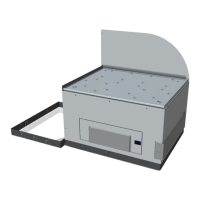
The NCR SelfServ™ 90 Security Scale Counter Top serves as a weighing platform that can be integrated into a kiosk environment. Its primary function is to accurately measure the weight of items placed on it, which is crucial for various retail and self-service applications, such as self-checkout systems where items need to be weighed for pricing or verification. The "security" aspect in its name suggests that it might also play a role in preventing shrink or ensuring accurate transactions by verifying item weights. The scale is designed to be a counter-top unit, meaning it sits on top of a counter or a dedicated surface, making it accessible for users. The inclusion of a bagrack indicates its suitability for environments where customers might place items into bags after weighing, streamlining the checkout process.
Important Technical Specifications
The manual provides specific technical specifications regarding the scale's capacity and physical dimensions, which are critical for installation and operational understanding:
-
Weight Capacity:
- Minimum allowable weight: 0.040 pounds (lb) or 0.018 kilograms (kg). This indicates the lowest weight the scale can accurately detect and measure.
- Maximum allowable weight: 30.000 pounds (lb) or 13.610 kilograms (kg). This is the highest weight the scale is designed to handle without damage or loss of accuracy. These specifications are provided for the scale when equipped with the bagrack, suggesting that the bagrack's weight is accounted for or that the scale's performance is rated with this accessory in place.
-
Mounting Hole Dimensions: The base plate of the scale features four mounting holes, each with a diameter of 9 mm (0.35 in). These holes are crucial for anchoring the scale to a counter top, ensuring stability and security.
-
Overall Dimensions of the Base Plate (Mounting Layout):
- Width: 310.80 mm (12.24 in)
- Depth: 234.60 mm (9.24 in)
- Specific internal measurements for hole placement:
- 125 mm (4.92 in) between the top two mounting holes (center-to-center).
- 62 mm (2.44 in) from the right edge to the center of the right-side mounting holes.
- 90 mm (3.54 in) from the left edge to the center of the left-side mounting holes.
- 160 mm (3.86 in) between the bottom two mounting holes (center-to-center).
- 37.30 mm (1.46 in) from the bottom edge to the center of the bottom-right mounting hole.
- 30.40 mm (1.20 in) from the bottom edge to the center of the bottom-left mounting hole.
- 92 mm (3.62 in) from the bottom edge to the center of the middle-bottom mounting hole.
- 248 mm (9.76 in) across the width of the base plate for internal component layout.
These detailed dimensions are essential for preparing the installation surface and ensuring proper alignment and fit within the kiosk environment.
Usage Features
The security scale is designed for straightforward integration and operation within the NCR SelfServ™ 90 Kiosk.
- Counter-Top Design: Its counter-top form factor makes it easily accessible for users to place items for weighing during transactions.
- Integrated Bagrack: The presence of a bagrack suggests a design optimized for retail environments where items are often bagged after weighing, improving workflow efficiency.
- USB Connectivity: The scale connects to the kiosk's motherboard via a USB D USB+12V power port. This standard connectivity ensures compatibility and ease of integration with the kiosk's existing infrastructure. The "USB+12V power port" indicates that the USB connection also supplies power to the scale, simplifying cabling.
- Leveling Mounts: The scale is equipped with four leveling mounts. These adjustable feet are a critical feature for ensuring accurate weight measurements. Scales must be perfectly level to provide precise readings, and these mounts allow for fine-tuning the scale's position on uneven surfaces.
- Security Anchoring: The base plate includes provisions for anchoring the scale to the counter top using customer-supplied anchors. This feature enhances security by preventing unauthorized removal or shifting of the scale, which is particularly important in public self-service environments.
Maintenance Features
While the document primarily focuses on installation, some aspects touch upon maintenance considerations:
- Modular Design (Implied): The process of removing the bagrack and top plate to access internal components (scale controller, cables, scale pods) suggests a modular design. This modularity can facilitate easier troubleshooting, repair, or replacement of individual components if necessary, rather than requiring the replacement of the entire unit.
- Cable Management: The instructions emphasize routing and securing the USB cable within the kiosk cabinet using cable ties and ensuring excess cable length is managed. Proper cable management is crucial for preventing damage to cables, ensuring reliable connections, and facilitating future maintenance or upgrades.
- Warning for Internal Components: The caution regarding the scale controller, cables, and scale pods when the top plate is removed highlights the importance of careful handling during maintenance. Specifically, the warning against interchanging pod cable connections and straining wires indicates that these components are sensitive and require attention to detail to prevent malfunction. This implies that if internal access is required for maintenance, technicians should be aware of these sensitivities.
- Leveling for Accuracy: The repeated instruction to adjust the leveling mounts to ensure the scale is level is a key maintenance-related step. Regular verification and adjustment of the leveling mounts are essential for maintaining the accuracy of the scale over time, especially if the kiosk or counter is moved or subjected to vibrations.
- Functionality Check: The final step in both installation procedures (with and without bolting) is to "Check that all modules in the Kiosk are working properly." This is a fundamental maintenance practice to confirm the successful integration and operation of the scale and other kiosk components.

 Need help?
 General

 To Next Page