72
3. Convenient Features
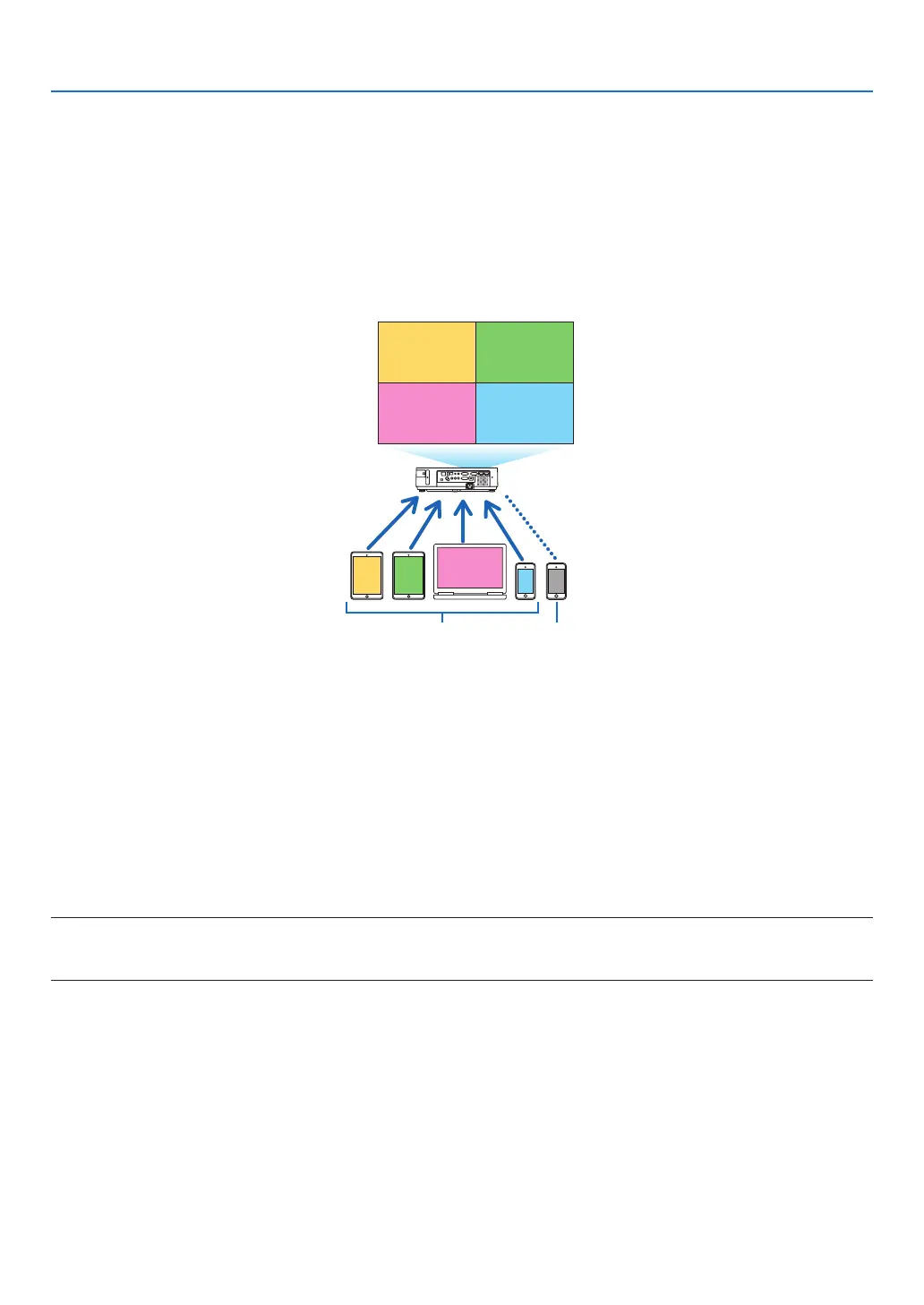
⓰ Simultaneously project images received from multiple
terminal units
Theprojectorreceivesimagestransferredfrommultipleterminalunits(Max.16units)andprojectsthemonthescreen
dividingit(Max.4×4)atthesametime.
• Ifvariousterminalunitssuchasacomputer,asmartphone,andatabletareconnectedwiththeprojectorinthe
network,itenablestotransferimagessavedoneachterminaltotheprojectorandtoprojectthem.
• YoucanconnectterminalunitsinmultipleOS(Windows,MacOS,Android,andiOS)withtheprojectorsimultane-
ously.
Transmit Stop
Simultaneous connection
Simultaneous display
• Installtheapplicationsoftware“ImageExpressUtilityLite”,includedintheCD-ROMsuppliedwiththeprojectoron
computers.(→page56)
• Forasmartphoneandatablet,downloadtheapplication“WirelessImageUtility”fromourwebsiteandinstalliton
these.(→page71)
ConnecttheprojectorwiththenetworkrstandthenbootuptheImageExpressUtilityLiteforoperation.
• Everytimepressing▲ or ▼buttonontheremotecontrol,displayedscreenwillswitchfrom/tothefull-screen
displayto/fromthedividedscreendisplay.
• If◀ or ▶buttonontheremotecontrolispressedinthestateofprojectioninthefull-screendisplay,itenablesto
changetheterminaltodisplay.
AboutdetailedinformationoftheImageExpressUtilityLite,pleaserefertotheHELPle.
NOTE:
• Thisprojectoronlysupportsthe[FREEmode]anddoesnotsupportthe[MANAGEDmode].
• ThisprojectordoesnotsupporttheUser'snameindication.



 To Next Page