
 To Next Page

K
katieramosAug 15, 2025
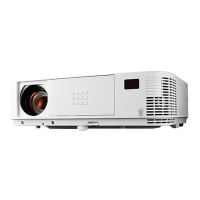
Why does my NEC M230X keep turning off?
- KKenneth BrownAug 15, 2025
If your NEC Projector turns off unexpectedly, ensure that the OFF TIMER and AUTO POWER OFF settings are disabled.

Why does my NEC M230X keep turning off?
If your NEC Projector turns off unexpectedly, ensure that the OFF TIMER and AUTO POWER OFF settings are disabled.
What to do if there is no picture on NEC Projector?
If there is no picture on your NEC Projector, start by using the COMPUTER1, COMPUTER2, VIDEO, or S-VIDEO button on the remote to select the correct source. Verify that all cables are securely connected. Adjust the brightness and contrast settings in the menu. Ensure the lens cover is open. You can also reset the settings to factory defaults via the RESET option in the menu. If the Security function is enabled, enter your registered keyword. Connect the projector and notebook PC while the projector is in standby mode, before powering on the notebook PC. If the screen goes blank, it may be due to your computer's screen-saver or power management settings.
Why does the picture suddenly become dark on my NEC M230X?
If the picture on your NEC Projector suddenly becomes dark, it might be in Forced ECO mode due to a high ambient temperature. To resolve this, select HIGH for FAN MODE to lower the projector's internal temperature.
Why does not NEC M230X Projector remote control work?
If the remote control for your NEC Projector isn't working, first install new batteries. Ensure there are no obstructions between you and the projector. Make sure you are within 22 feet (7 m) of the projector.
Why does flicker appear on screen of NEC Projector?
If a flicker appears on the screen of your NEC Projector, and you are using the projector at altitudes less than approximately 5500 feet/1600 meters, ensure that the FAN MODE is set to a mode other than HIGH ALTITUDE.
How to fix a blurred picture on NEC M230X Projector?
If the picture on your NEC Projector is blurred, try adjusting the focus. Reposition the projector to improve its angle relative to the screen. Make sure the distance between the projector and the screen is within the lens's adjustment range. If condensation has formed on the lens (especially after moving the projector from a cold to a warm environment), allow the projector to stand until the condensation clears.
Why is the color tone or hue unusual on my NEC M230X?
If the color tone or hue on your NEC Projector is unusual, check if an appropriate color is selected in WALL COLOR and adjust if necessary. You can also adjust the HUE setting in PICTURE.
How to fix an image that isn’t square to the screen on NEC M230X?
If the image from your NEC Projector isn't square to the screen, reposition the projector to improve its angle to the screen. You can also use the Keystone correction function to correct trapezoid distortion.
How to stop image from scrolling vertically/horizontally on NEC Projector?
If the image on your NEC Projector is scrolling vertically, horizontally, or both, check the computer's resolution and frequency. You can also manually adjust the computer image using the Horizontal/Vertical settings in the IMAGE OPTIONS.
How to fix cross color in RGB mode on NEC M230X?
To correct cross color in RGB mode on your NEC Projector, press the AUTO ADJ. button on the projector cabinet or the remote control. Additionally, you can manually adjust the computer image with CLOCK/PHASE in IMAGE OPTIONS in the menu.
Lists all included items in the projector package for user verification.
Introduces the projector's capabilities and key features for user benefit.
Guides users on connecting the projector to a source and powering it on.
Covers adjusting image size, focus, and keystone for optimal display.
Provides instructions on how to properly turn off the projector after use.
Explains features like AV mute, freeze, and picture enlargement for enhanced control.
Details network connection setup and remote control via HTTP browser or LAN.
Explains how to use the projector's built-in viewer for USB media playback.
Covers projector placement, screen setup, and connecting various input sources.
Guides on cleaning filters, lens, cabinet, and replacing the lamp.
Provides solutions for common problems like no image, distortion, or connectivity issues.
Lists detailed technical specifications including resolution, light output, and dimensions.
 General
| Matrix size | 0.63 \ |
|---|---|
| Matrix type | 3-panel (p-Si TFT active) |
| Native aspect ratio | 4:3 |
| Projection distance | 0.6 - 13.8 m |
| Vertical scan range | 50 - 120 Hz |
| Horizontal scan range | 15 - 100 kHz |
| Projection technology | LCD |
| Supported aspect ratios | 4:3, 5:4, 16:9, 16:10 |
| Contrast ratio (typical) | 2000:1 |
| Screen size compatibility | 25 - 300 \ |
| Projector native resolution | XGA (1024x768) |
| Keystone correction, vertical | -30 - 30 ° |
| Vertical synchronization (max) | 120 kHz |
| Vertical synchronization (min) | 50 kHz |
| Horizontal synchronization (max) | 100 kHz |
| Horizontal synchronization (min) | 15 kHz |
| Projector brightness (economic mode) | 1840 ANSI lumens |
| Focus | Manual |
| Throw ratio | 1.3 - 2.2 |
| Focal length range | 17.5 - 29 mm |
| Aperture range (F-F) | 1.7 - 2.2 |
| Lamp power | 180 W |
| Light source type | Lamp |
| Lamp power (economic mode) | 145 W |
| Service life of light source | 5000 h |
| Service life of light source (economic mode) | 6000 h |
| 3D | No |
| HD-Ready | Yes |
| Supported video modes | 1080i, 480i, 480p, 576i, 576p, 720p |
| Analog signal format system | NTSC, NTSC 4.43, PAL, SECAM |
| Supported graphics resolutions | 720 x 480, 720 x 576, 832 x 624, 1152 x 870, 1366 x 768, 1600 x 900, 1024 x 768 (XGA), 1152 x 864 (XGA+), 1280 x 1024 (SXGA), 1280 x 720 (HD 720), 1280 x 768 (WXGA), 1280 x 800 (WXGA), 1360 x 768 (WXGA), 1400 x 1050 (SXGA+), 1440 x 900 (WXGA+), 1600 x 1200 (UXGA), 1680 x 1050 (WSXGA+), 1920 x 1080 (HD 1080), 640 x 480 (VGA), 800 x 600 (SVGA) |
| RMS rated power | 10 W |
| Number of built-in speakers | 1 |
| Dimensions (WxDxH) | 339 x 257 x 99 mm |
| Connectivity technology | Wired |
| Serial interface type | RS-232 |
| USB 2.0 ports quantity | 3 |
| Component video (YPbPr/YCbCr) in | 0 |
| Cables included | AC, VGA |
| HDCP | - |
| Noise level | 34 dB |
| Certification | CE, ErP, TÜV GS, TCO, Gost-R. |
| Noise level (economic mode) | 27 dB |
| Power source | AC |
| AC input voltage | 100 - 240 V |
| AC input frequency | 50 - 60 Hz |
| Power consumption (standby) | 0.4 W |
| Power consumption (typical) | 239 W |
| Storage temperature (T-T) | -10 - 50 °C |
| Operating temperature (T-T) | 5 - 40 °C |
| Operating relative humidity (H-H) | 20 - 80 % |
| Product type | Standard throw projector |
| Product color | White |
| Market positioning | Portable |
| Sustainability certificates | RoHS |
 Weight and Dimensions
| Depth | 257 mm |
|---|---|
| Width | 339 mm |
| Height | 99 mm |
| Weight | 2900 g |