(31/71)
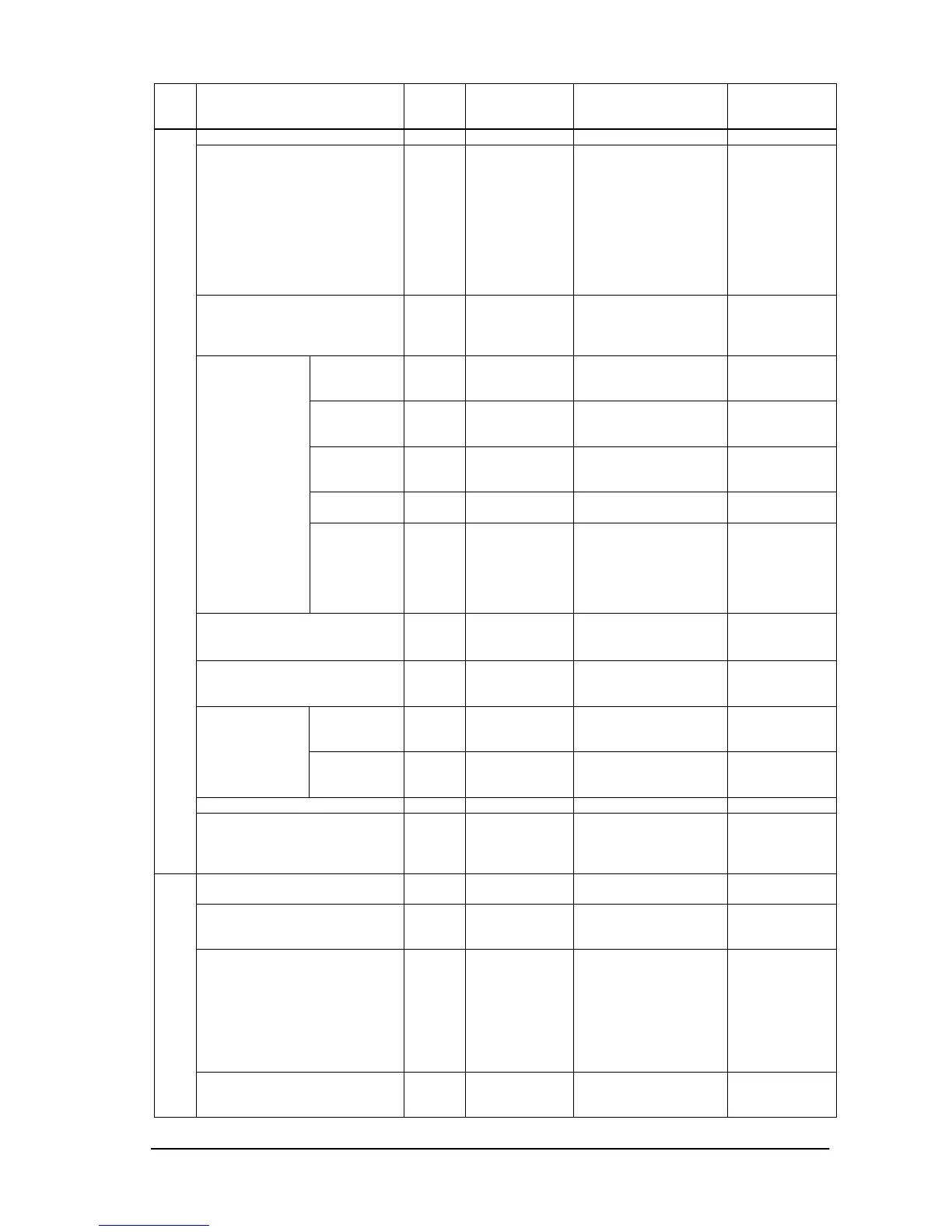
Item OP
code
page
OP code Parameter Remarks
Monitor ID 02h 3Eh 1-100:ID
Group ID 10h 7Fh 0: No assignment
1: Group A
2: Group B
3: Group AB
4: Group C
5: Group AC
│
1023:Group
ABCDEFGHIJ
Bit0:Group A
Position 02h D2h 1: Upper left
|
MAX.: Lower right
Tile comp 02h D5h 1: Disable (Off)
2: Enable (On)
Tile
Matrix
Mode 02h D3h 1: Disable (Off)
and display frame
2: Enable (On)
3: Disable (Off)
and erase frame
(Set only)
Power On Delay 02h D8h 0: Off (0sec)
│
50:50sec
Power Indicator 02h BEh 0: None
1: On
2: Off
Control 10h 3Eh 0: No mean
1: RS-232C
2: LAN
External
control
ID=All
Reply
10h 85h 0: No operate
1: On
2: Off
Setting copy N/A
MULTI DISPLAY
Menu tree reset
(Multi Display)
02h CBh 0: None
8: Reset
Multi Display
category
Momentary
Power Save 00h E1h 0: Off
1: On
Video Power Save 02h D6h 0: No mean
1: Off
2: On
Fan Control 02h 7Dh 0: None
1: Auto(No offset)






 To Next Page