114
Thissectiondescribesthesimplemaintenanceproceduresyoushouldfollowtocleanthelters,thelens,thecabinet,
andtoreplacethelampandthelters.
1 Cleaning the Filters
Theair-lterspongekeepsdustanddirtfromgettinginsidetheprojectorandshouldbefrequentlycleaned.Ifthelter
isdirtyorclogged,yourprojectormayoverheat.
NOTE:Themessageforltercleaningwillbedisplayedforoneminuteaftertheprojectoristurnedonoroff.Whenthemessageis
displayed,cleanthelters.Thetimetocleantheltersissetto[6000H]attimeofshipmentonM311X/M271X/M271W;thetime
tocleantheltersissetto[5000H]attimeofshipmentonM361X/M311W.
Tocancelthemessage,pressanybuttonontheprojectorcabinetortheremotecontrol.
Thetwo-layerlterontheprojectorimprovescoolinganddust-proofcapabilitiescomparedwiththeconventional
models.
Theoutsides(intakeside)oftherstandsecondlayerltersremovedust.
Tocleanthelter,detachthelterunitandtheltercover.
CAUTION
• Beforecleaningthelters,turnofftheprojector,disconnectthepowercordandthenallowthecabinettocool.
Failuretodosocanresultinelectricshockorburninjuries.
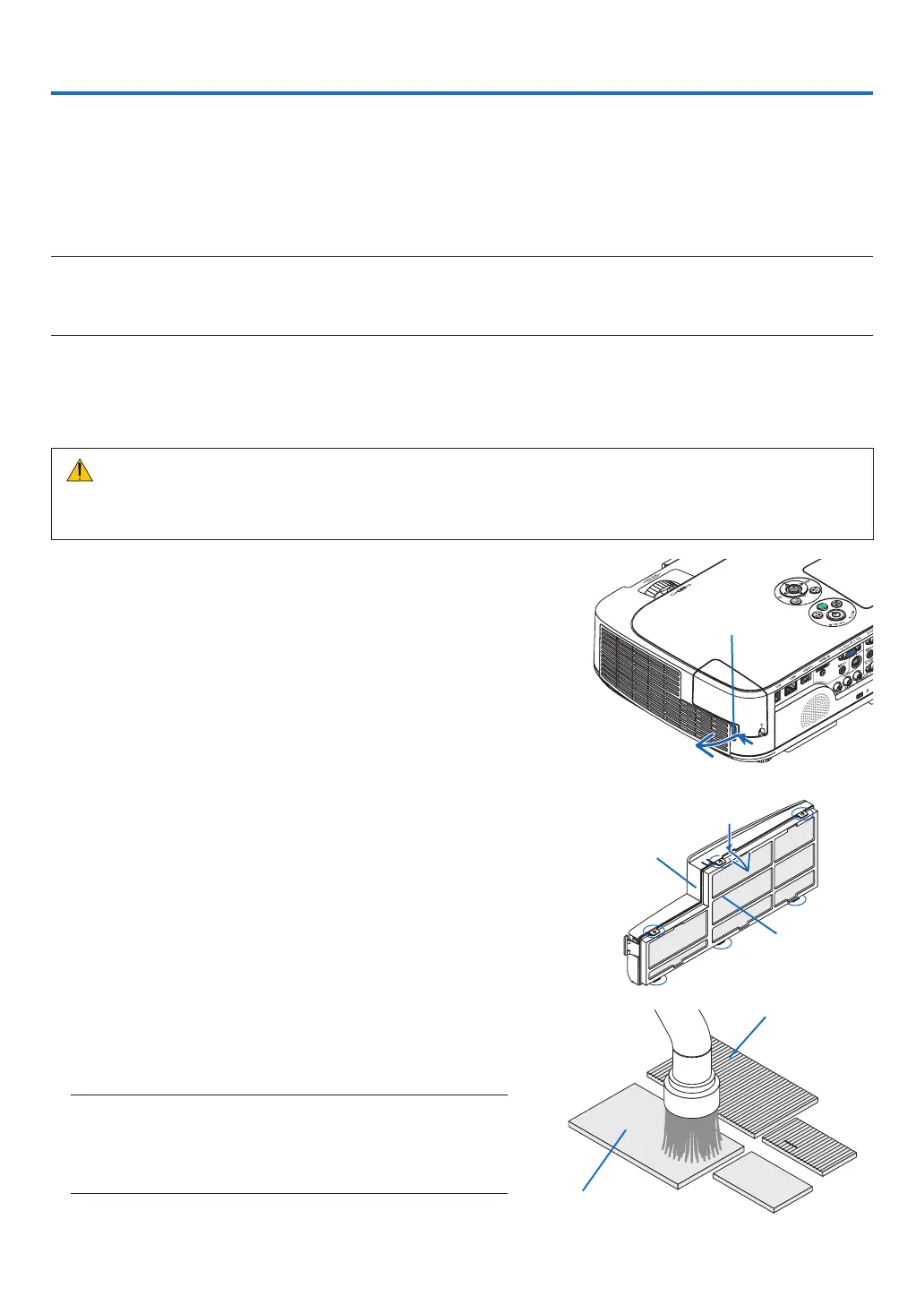
1. Pushthebuttontoreleasethelterunitandpullitout.
TIP:
Thefollowingexplanationuseslters(ne-texturespongeand
coarse-texturesponge)attachedtotheprojectoratthetimeof
purchaseasanexample.
Afterreplacingwithltersincludedintheoptionallamp,replacethe
words“ne-texturespongeandcoarse-texturesponge”with“ac-
cordionsoftandhoneycombhard”respectively.
2. Remove the filter cover.
The filter cover is fixed at six separate mounting points.
Bow the filter cover by pushing the notch slightly until it re-
leases.
3. Remove the four lters and use a vacuum cleaner to
vacuumallthedustinside.
Get rid of dust in the sponge filter
NOTE:
• Wheneveryouvacuumthelter,usethesoftbrushattachmentto
vacuum.Thisistoavoiddamagetothelter.
• Donotwashthelterwithwater.Doingsocanresultinlterclog-
ging.
Button
Notch
Filter unit
Filter cover
Fine-texture
sponge
Coarse-texture sponge
7. Maintenance


 To Next Page