9
1. Introduction
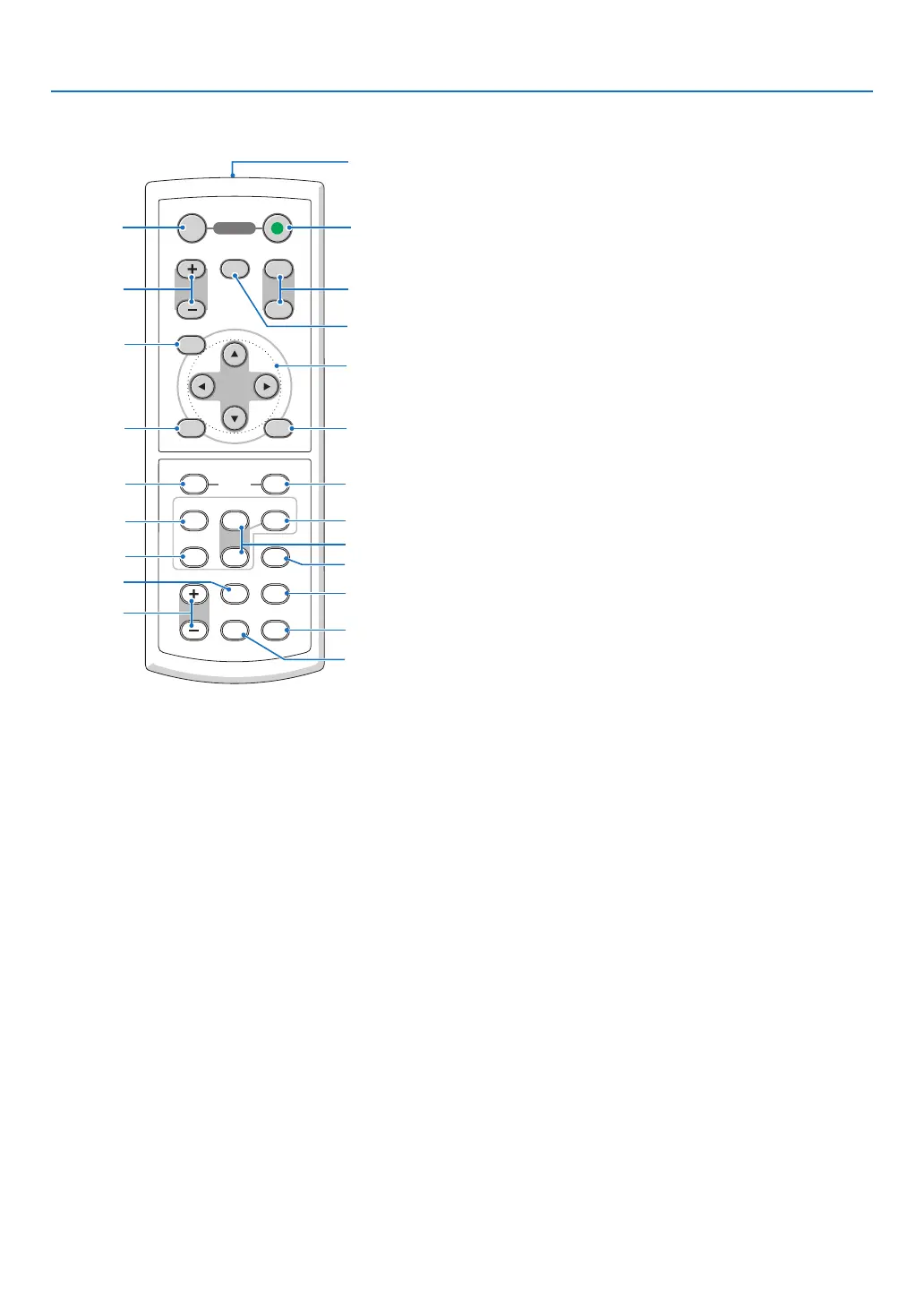
Part Names of the Remote Control
1. Infrared Transmitter
(
→ page 10)
2. POWER ON Button
(
→ page 27)
3. POWER OFF Button
(
→ page 38)
4. MAGNIFY (+)(–) Button
(
→ page 40)
5. PIC-MUTE Button
(
→ page 40)
6. PAGE UP/DOWN Button*
(
→ page 45, 46)
7. MENU Button
(
→ page 51)
8. SELECT Button (→ page 51)
9. ENTER Button (→ page 51)
10. EXIT Button (→ page 51)
11. MOUSE L-CLICK Button*
(
→ page 45, 46)
VOLUME
L-CLICK
ENTER
EXIT
MENU
UP
MAGNIFY PAGE
OFF
POWER
ON
PIC-MUTE
DOWN
MOUSE
R-CLICK
COMPUTER
ASPECT HELP
FREEZEPICTURE
S-VIDEO
VIDEO
COMPUTER
AUTO ADJ.
LAMP MODE
2
1
1
3
4
7
6
9
2
8
10
11
13
14
12
21
22
20
16
15
18
5
17
19
12. MOUSE R-CLICK Button*
(
→ page 45, 46)
13. VIDEO Button
(
→ page 29)
14. S-VIDEO Button
(
→ page 29)
15. COMPUTER 1/2 Button
(
→ page 29)
16. AUTO ADJ. Button
(
→ page 37)
17. VOLUME (+)(–) Button
(
→ page 37)
18. LAMP MODE Button (→ page 41)
19. ASPECT Button
(
→ page 60)
20. PICTURE Button
(
→ page 56, 57)
21. HELP Button
(
→ page 73)
22. FREEZE Button
(
→ page 40)
* The PAGE UP/DOWN, MOUSE L-CLICK and MOUSE R-CLICK buttons work only when the optional remote mouse
receiver is connected with your computer.




 To Next Page