E-8
90˚
Adjusting the Position and Size of the Projected Image
(Focus Adjustments)
• After turning on the power, projected images may flicker for 3 to 5 minutes until the lamp lighting is stabilized.
Also after turning on the projector, the picture position may be slightly changed.
Wait 10 minutes until the light status and projected images become stable.
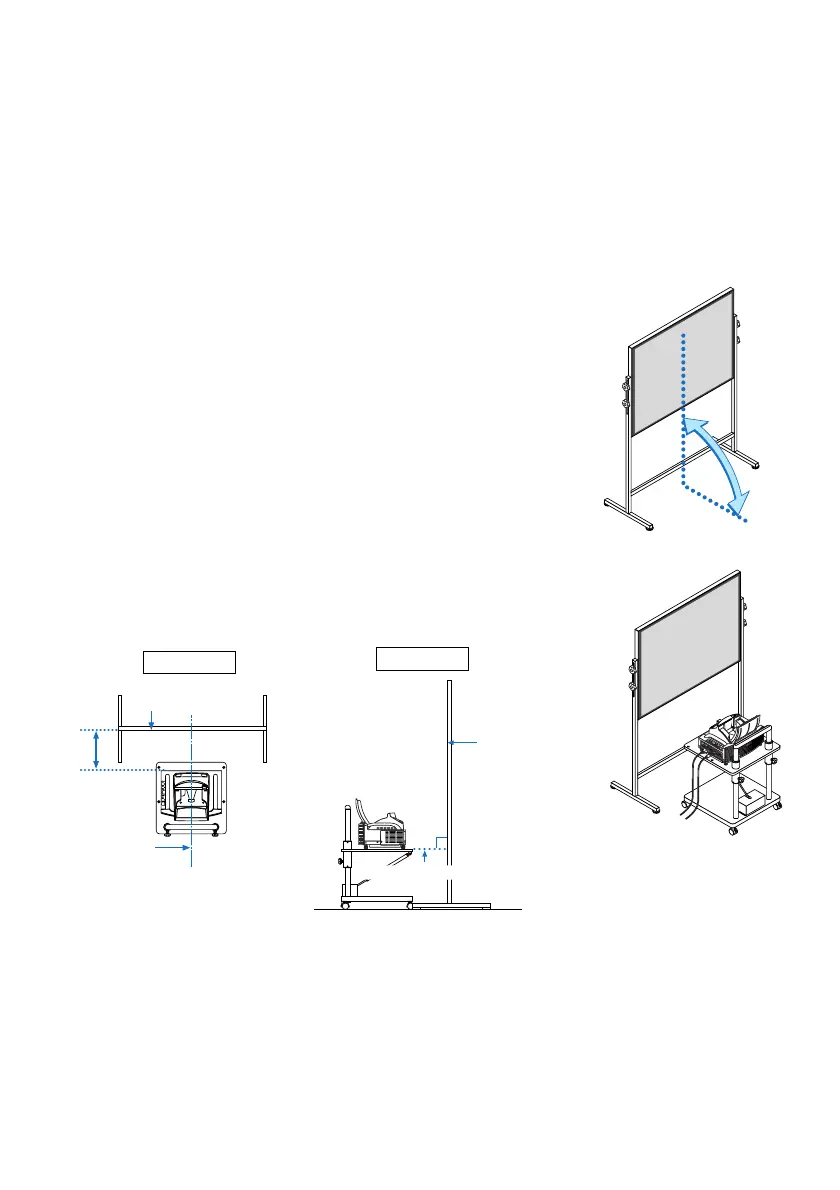
• If the screen is tilted vertically or horizontally, keystone distortion becomes large. Proceed with the following
steps to correctly set up the projector and the screen.
90
°
Top view
Side view
Screen surface
Screen surface
Parallel
Align the
projector
center with
the screen
center
Bottom of projector
1. Check whether the screen is set up to be vertical by viewing it from
the side.
2. Check that the projector is set to be parallel with the screen.
Operations common to both WT615 and WT610


 To Next Page