4
Connecting machine to power source
2
ON
OFF
1
n
Attention
Always make sure that the machine is
unplugged from power source and the main
switch is off ("O"), when the machine is not
in use and before inserting or removing
parts.
Before connecting the power supply, make
sure that the voltage shown on the rating
plate is conforming with your main power.
Put the machine on a stable table.
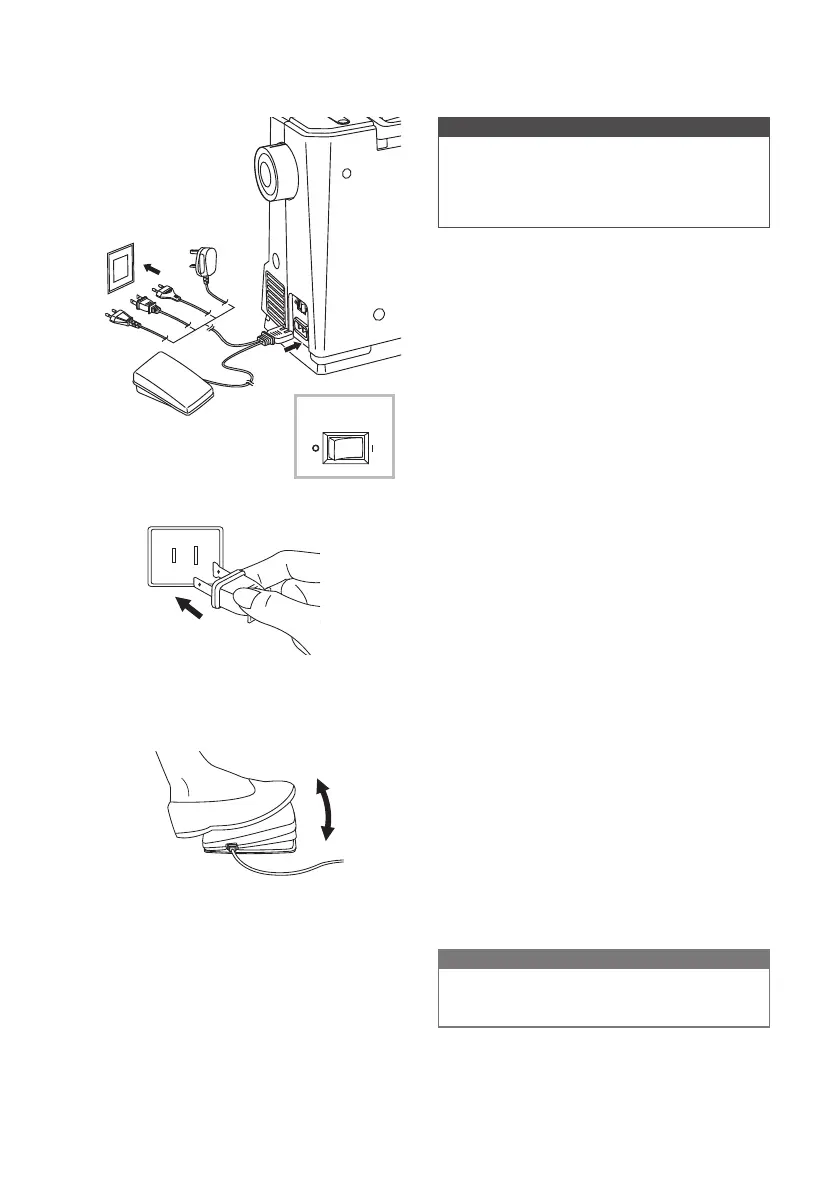
1. Connect the machine to a power source
as illustrated.
2. Turn the power switch to on ("I").
The sewing lamp will light up when the switch
is turned on.
v
Polarized plug information
This appliance has a polarized plug (one
blade is wider than the other), to reduce the
ULVNRIHOHFWULFDOVKRFNWKLVSOXJZLOO¿WLQD
polarized outlet only one way. If the plug does
QRW¿WIXOO\LQWKHRXWOHWUHYHUVHWKHSOXJ,ILW
VWLOOGRHVQRW¿WFRQWDFWDTXDOL¿HGHOHFWULFLDQ
to install the proper outlet. Do not modify the
plug in any way.
v
Foot control
When the machine is off, insert the foot
control plug into its connector on the machine.
Turn on the machine, and then slowly press
down the foot control to start sewing. Release
the foot control to stop the machine.
User can quickly kick one step on the foot
control to change the needle position and set
the stop position at the same time.
Note
&RQVXOWDTXDOL¿HGHOHFWULFLDQLILQGRXEW
as to connect the machine to the power
source.


 To Next Page