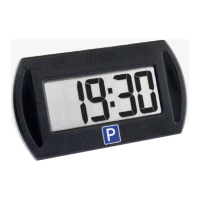
68 - EN
release once the desired me appears. Put PARK PRO back to
the holder.
Parking start me seng 00:tu: each pressing will postpone
the starng me by 30 minutes: e.g. 13:30>> 14:00>>14:30…
Parking start me seng 15:tu: each pressing will postpone
the starng me by 15 minutes: e.g. 13:15>> 13:30>>
13:45>>14:00…
Parking start me seng 30:tu: each pressing will postpone
the starng me by 30 minutes: e.g. 13:30>> 14:00>>
14:30>>15:00…
Baery
If the BAT indicator ashes for 10 seconds when the PARK
PRO
goes into park mode or out of it, the baery needs to be
replaced within a week.
The baery CR 2032 (3 V) is commercially available.
DO NOT FORGET TO SET THE CLOCK!
When you change the baery, the clock is automacally reset�
All sengs need to be done as described above. Check the
funconality aer making the sengs.


 To Next Page