Page 11 of 12
Troubleshooting
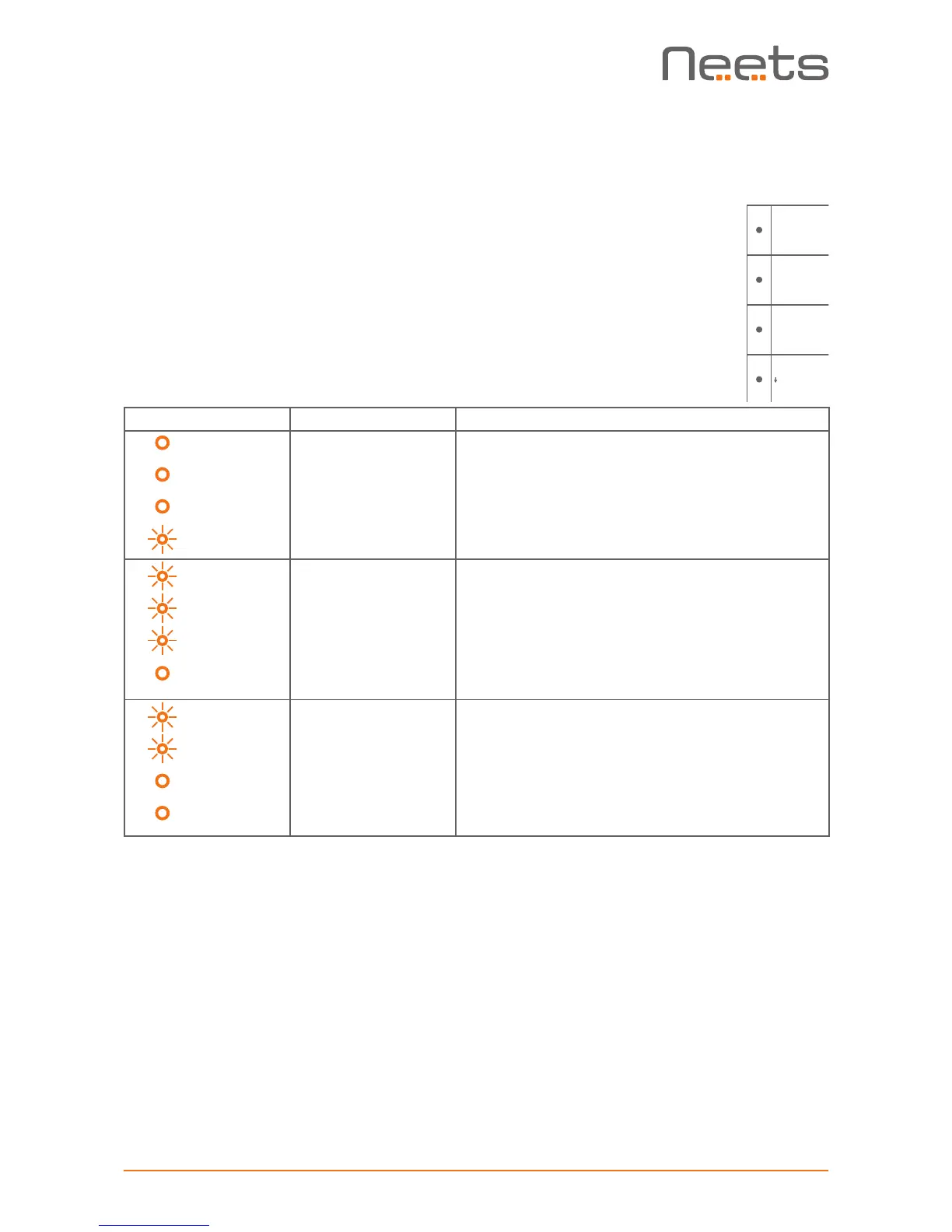
Error indication using LEDs
If there is a fault in either the configuration or the EcHo Plus unit, this will be
indicated on the front button LED indicators. Button LEDs 1-4 are used to
indicate the error; the LED indicators are numbered as shown.
The flashing error descriptions and patterns are described below:
LED shows Description Solution
1 Off
2 Off
3 Off
4 Flashing
No connection to one
or more NEB units.
o Check that the NEB units used in the project
are connected.
o Check that the NEB units used in the project
are configured correctly.
o After doing one of the above, remove the power
to the control system for 20 sec before recon-
necting the power again.
1 Flashing
2 Flashing
3 Flashing
4 Off
No project found on
the control system
or unable to start
the project
o Try to upload the project again.
o Alternatively, there can be a problem in the proj-
ect you have uploaded. In this case, try upload-
ing an empty project and see if this works.
1 Flashing
2 Flashing
3 Off
4 Off
Unexpected Error o Turn off the power to the control system for 20
sec before turning the power on again.
A/V MUTE


 To Next Page