If the shutter speed is set equal to, or slower than, the maximum flash sync
speed of the camera, the "" "" icon will not be displayed in the viewfinder.
With High Speed Sync, the higher the shutter speed, the smaller the effective
flash range.
To resume normal flash, press the High Speed Sync button again. The "" ""
icon will disappear.
High speed sync flash is not available in Multi Flash mode.
The flash features an overheat protection function which will kick in after 50
consecutive high speed synchronized flashes.
07
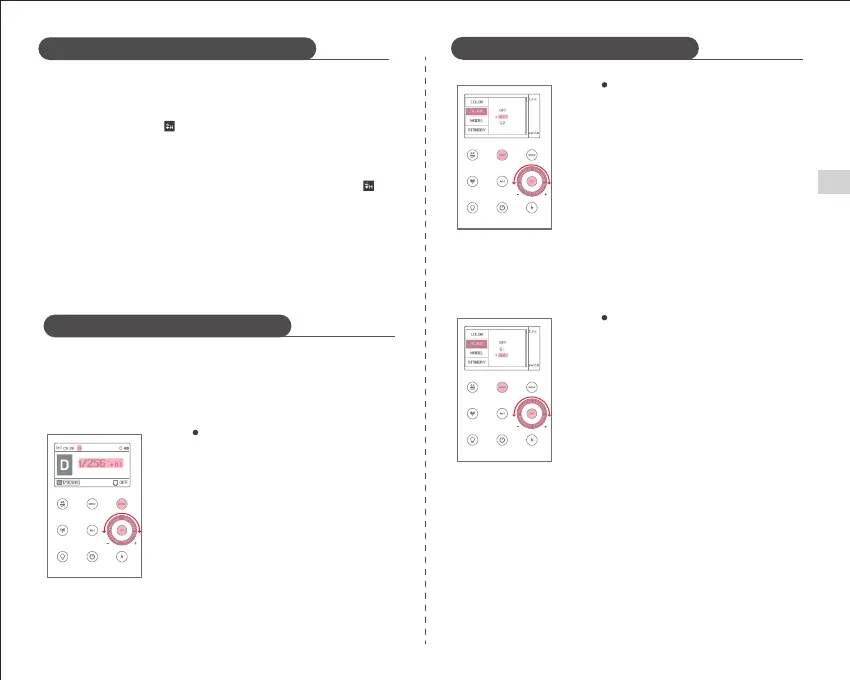
Short press the mode button "MODE". When
"M" appears on the screen, the flash has been
set to M mode.
The flash output can be set by turning the
adjustment wheel. Press the "SET" setting
button again to confirm the flash output.
In M Manual Flash Mode, press the <MENU>
button to enter the C.Fn - SLAVE and select S1.
The flash can be used as a secondary light to
create a variety of lighting effects, suitable for
a manual flash environment. It will trigger
the flash synchronously with the first flash
of the master flash which is the effect
consistent with the use of wireless flash
triggers.
Setting the S1 Optical Unit
Press the <MENU> button to enter C.Fn - SLAVE
and select S2. The flash can be used as a
secondary light for TTL flash environments.
With the anti-pre-flash function, the camera
with a pre-flash function can be used to
synchronize shooting with the optic slave.
It will trigger the flash synchronously with
the second flash of the main flash, that is, a
two light-controlled flash.
Setting the S2 Optical Unit
Setting the Flash Power to M mode
Flash Mode - TTL Automatic Flash Mode
Flash Mode - M Manual Flash Mode
Flash Mode - M Manual Flash Mode
M Mode allows you to set the flash output in 0.1-stop increments from 1/256
power to 1/1 full power. To obtain the correct flash exposure, please use a
handheld flash meter to determine the required flash output.
Notes
※ The S1/S2 optical slave flash mode is supported only in M mode when the
wireless function is turned off.
EN


 To Next Page