08
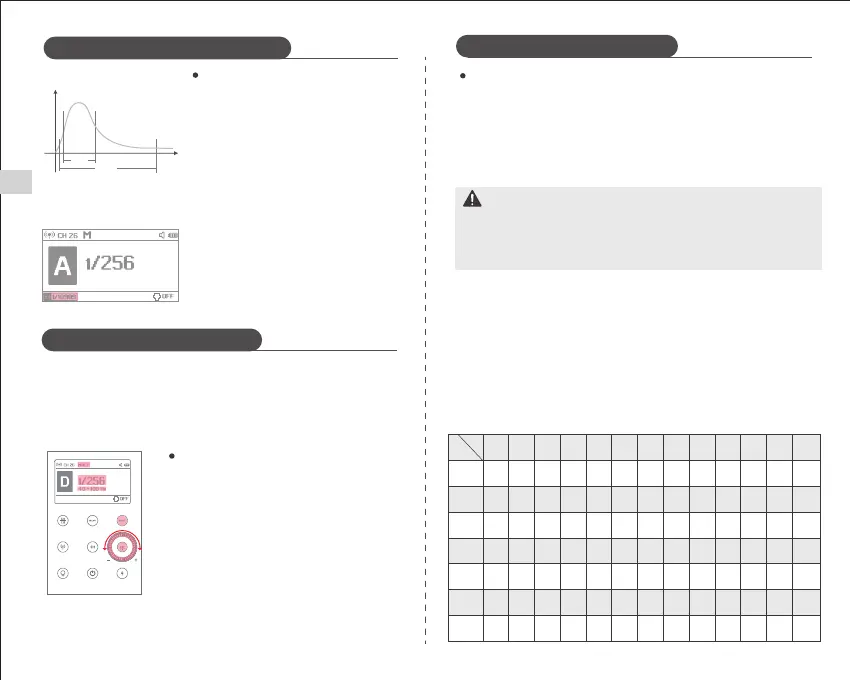
Flash duration is the time from the start of the
flash to reach the half-peak of light. Half-peak
is expressed as t = 0.5. In order to provide
photographers with more detailed shooting
values, this product uses t = 0.1.
The difference between t=0.5 and t=0.1 is
shown on the left.
The Multi Flash Mode emits a series of rapid flashes. It allows users to take
multiple images of moving objects in a single picture. You can set the flash
frequency (the number of flashes per second, expressed in Hz), the flash times
and the flash output power.
※ Flash Duration is displayed only in M mode.
Displaying the Flash Duration
Setting the Multi Flash Mode
When the word "MULTI" appears on the screen, the
flash is now set in strobe mode. The flash output
can be set by rotating the wheel.
Press the "SET" button again to set the number of
flashes and rotate the dial to set the value.
Press the "SET" button again to set the flash
frequency and rotate the dial to set the value.
Finally press the "SET" button again to set all
values.
Calculating the Shutter Speed
In Multi Flash Mode, the shutter should remain open until the flash stops. Use
the following formula to calculate the shutter speed, and then set the camera.
Shutter Speed = Flash Times/Flash Frequency
For example, if the Flash Times is 10 and the Flash Frequency is 5Hz, the shutter
speed should be at least 2 seconds.
To prevent overheating and damage to the flash, do not perform multi
strobes/flashes of more than 10 consecutive flashes. After 10 flashes, let the flash
cool down for at least 15 minutes. If you try to perform more than 10 consecutive
multi strobes/flashes, the flash may stop automatically to prevent the flash head
from overheating. If this happens, let the flash cool down for at least 15 minutes.
Flash Mode - M Manual Flash Mode
Flash Mode - Multi Flash Mode
Flash Mode - Multi Flash Mode
A
t
50%
10%
t=0.5
t
=0.1
Notes
● Very reflective subjects are more effective with strobe flashes in front of a
dark background.
● The use of a tripod and remote is recommended.
● Multi Flash Mode cannot be set when the flash output is 1/1 and 1/2.
● Multi Flash Mode can also be used with "buLb".
● If the flash time is displayed as --, the light will flash continuously until the
shutter or battery is exhausted.
The flash times will be limited as shown in the table below.
Hz
1 2 3 4 5 6~7 8~9 10 11 12~14 15~19 20~50 60~100
1/4
1/8
1/46
1/32
1/64
1/128
1/256
Flash
Output
Full Power Flash Times
Flash Mode - M Manual Flash Mode
8
14
30
60
90
100
100
6
14
30
60
90
100
100
4
12
30
60
90
100
100
3
10
20
50
80
100
100
3
8
20
50
80
100
100
2
6
20
40
70
90
90
2
5
10
30
60
80
80
2
4
8
20
50
70
70
2
4
8
20
40
70
70
2
4
8
20
40
60
60
2
4
8
18
35
50
50
2
4
8
16
30
40
40
2
4
8
12
20
40
40
EN


 To Next Page
 Loading...