EasyManua.ls Logo

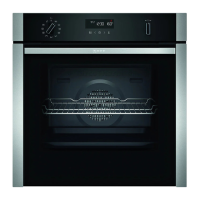
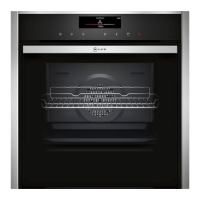
NEFF B4AVH1AH0B - User Manual

NEFF B4AVH1AH0B
48 pages
Print Icon
To Next Page IconTo Next Page
Loading...
[en] INSTRUCTION MANUAL
BUILT-IN OVEN
B4AVH1AH0B

Table of Contents

Other manuals for NEFF B4AVH1AH0B

Questions and Answers

  • E
    Emily JohnsonAug 7, 2025
    What to do if my NEFF B4AVH1AH0B Oven is not working?
    • J
      jennamontgomeryAug 7, 2025
      If your NEFF Oven isn't working, there might be a few reasons. First, check the circuit breaker in the fuse box to see if it has tripped. Also, check if there has been a power cut in your kitchen or if other appliances are working. If neither of those is the issue, it could be an electronics fault. In that case, try briefly disconnecting the oven from the power supply by switching off the fuse and resetting the basic settings to the factory settings.
  • C
    Christine OrtegaAug 10, 2025
    What to do if my NEFF B4AVH1AH0B Oven does not heat up but lights up?
    • A
      Anthony KramerAug 10, 2025
      If your NEFF Oven lights up but doesn't heat, the demo mode may be activated. You can deactivate demo mode within 5 minutes by changing the last basic setting.
  • R
    rrobinsonAug 15, 2025
    Why does the time flash on my NEFF B4AVH1AH0B display?
    • J
      John HerreraAug 15, 2025
      If the time is flashing on your NEFF Oven display, it usually means there has been a power cut. To fix this, simply reset the time.
  • J
    jonesjamesAug 25, 2025
    What to do if the NEFF B4AVH1AH0B Oven cooking compartment is too hot?
    • T
      Travis GriffinAug 25, 2025
      If the cooking compartment of your NEFF Oven is too hot for the selected operation, switch off the appliance and allow it to cool down. Then, restart the operation.
  • S
    Steven EatonAug 28, 2025
    Why won't the steam-assisted operation start on my NEFF B4AVH1AH0B?
    • R
      Rhonda RaymondAug 28, 2025
      If the steam-assisted operation on your NEFF Oven isn't starting, it could be due to a few reasons: * The water tank might be empty, so you should fill it. * Descaling locks operations with steam-assisted cooking, so you should run the descaling program in full. * The steam system could be defective, in which case you should call the after-sales service.
  • A
    Aaron ColemanSep 1, 2025
    What to do if there is too much water in the steam system of my NEFF B4AVH1AH0B Oven?
    • M
      Michael MillsSep 1, 2025
      If there's too much water in the steam system of your NEFF Oven, empty the water tank and insert the empty water tank. Reset the time, then switch the appliance off and on again. Finally, run 'Descaling interrupted' in full.
  • V
    Victoria HarveySep 10, 2025
    Why does the time not appear on my NEFF B4AVH1AH0B display?
    • C
      Christopher GonzalezSep 12, 2025
      If the time isn't showing on your NEFF Oven display, it's likely that the basic setting for the time display has been changed. You'll need to adjust the basic setting to show the time.

Summary

Intended use

Important safety information

Causes of damage

Getting to know your appliance

Buttons and display

Explains the functions of buttons and symbols on the control panel and display.

Types of heating and functions

Describes different heating types, temperatures, and their uses.

Before using for the first time

Cleaning the cooking compartment

Details the initial cleaning process for the cooking compartment.

Operating the appliance

Switching the appliance on and off

Explains the procedure for turning the appliance on and off.

Setting the type of heating and temperature

Details how to select heating functions and adjust temperatures.

Steam

Steam-assisted cooking

Details how steam enhances cooking results for various foods.

Filling the water tank

Provides instructions on how to fill the water tank correctly.

After every steam operation

Details post-operation procedures for steam functions, including emptying the water tank.

Emptying the water tank

Step-by-step guide to safely empty and clean the water tank.

Time-setting options

Setting the timer

Details how to use the appliance's built-in timer function.

Setting the cooking time

Guides on setting the duration for cooking cycles.

Setting the end time

Explains how to schedule the appliance to finish cooking at a specific time.

Childproof lock

Automatic childproof lock

Explains the automatic childproof lock feature and its operation.

Programmes

Selecting a dish

Provides a table with settings for various dishes.

Setting a program

Step-by-step guide to selecting and setting a cooking program.

Cleaning agent

Suitable cleaning agents

Lists recommended and prohibited cleaning agents for appliance care.

Cleaning function

Descaling

Details the process and importance of descaling the appliance.

Start descaling

Step-by-step instructions for initiating the descaling program.

Appliance door

Removing and fitting the appliance door

Step-by-step guide for detaching and reattaching the oven door.

Detaching the appliance door

Detailed instructions for safely removing the appliance door.

Refitting the appliance door

Instructions on how to correctly reattach the appliance door.

Removing and installing the door panels

Steps for removing and reinstalling the glass panels of the appliance door.

Trouble shooting

Rectifying faults yourself

Offers solutions for common appliance faults and errors.

Error messages on the display

Explains how to interpret and resolve error messages shown on the display.

Customer service

E number and FD number

Explains the importance of E and FD numbers for service inquiries.

Tested for you in our cooking studio

Baking

Provides recommended settings for various baking recipes and tips for levels.

Roasting, braising and grilling

Provides guidance and settings for roasting, braising, and grilling poultry, meat, and fish.

Preserving

Guidance on preserving fruit and vegetables using the appliance.

NEFF B4AVH1AH0B Specifications

General IconGeneral
TypeBuilt-in Oven
Energy Efficiency ClassA
Oven Capacity71 L
Control TypeElectronic
ColorStainless Steel
Dimensions (HxWxD)595 x 594 x 548 mm
Width594 mm
Height595 mm
Depth548 mm
Number of Oven Levels5
ElectricYes
Voltage220-240 V
Frequency50 Hz
Installation TypeBuilt-in
Door OpeningDrop Down

Related product manuals