13Chapter 2 .
Basics
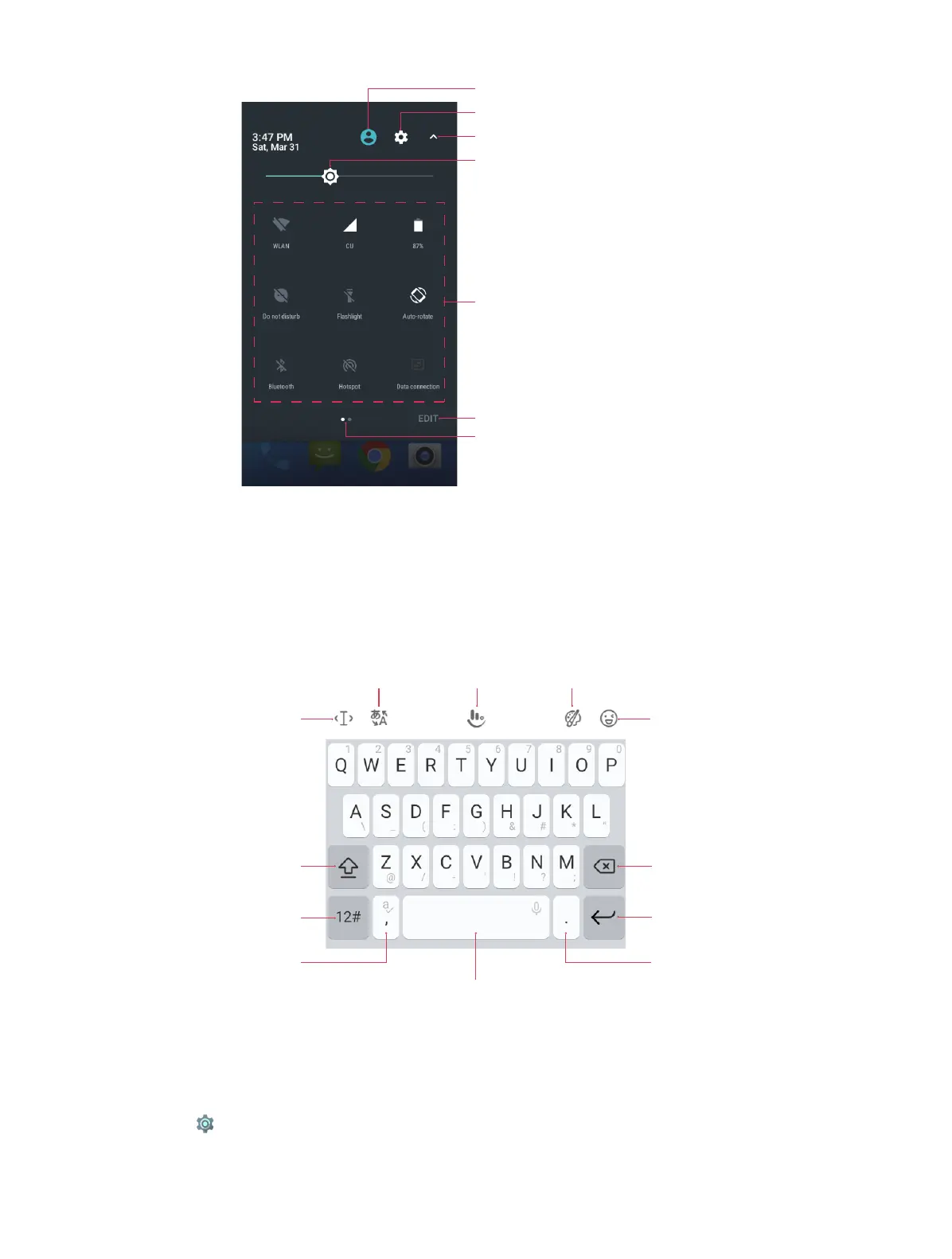
Users: Tap to choose the users.
Brightness slider: Use this slider to adjust the
brightness of the screen.
Settings: Tap to go to Settings.
Tap to fold the Quick Settings Panel.
Shortcut switches: Tap to enable/disable
functions quickly.
Edit: Tap to enter the edit page.
Screen indicator: Slide to change to next screen
to view other options.
2. 7 Type text
Enter text
The keyboard enables you to enter text when needed. Your Neffos C5s use Touchpal by default.
Touch and hold the letter to enter the number or symbol next to it.
Edit the content
Choose language
Set the Keybord Choose the theme
Insert emoji
Tap it and then tap a letter to
type uppercase.
Double-tap for caps lock.
Delete the characters to the
left of the cursor.
Start a new line.Enter numbers, punctuations
and symbols.
Enter a comma. Touch and
hold it to turn on/off
prediction.
Enter a space.
Double-tap to end a sentence with a period.
Touch and hold to open Google voice typing
Enter a period. Touch and
hold to enter a symbol.
Spell checker
You can turn on the Spell checker feature to help you enter correct words.
1. Go to Settings -> Languages & input -> Spell checker.
2. Turn on the switch.



 To Next Page