Saturn B/M Enhanced Functions – Chapter 2. Standard
2.5
Traffic Logging Cont’d
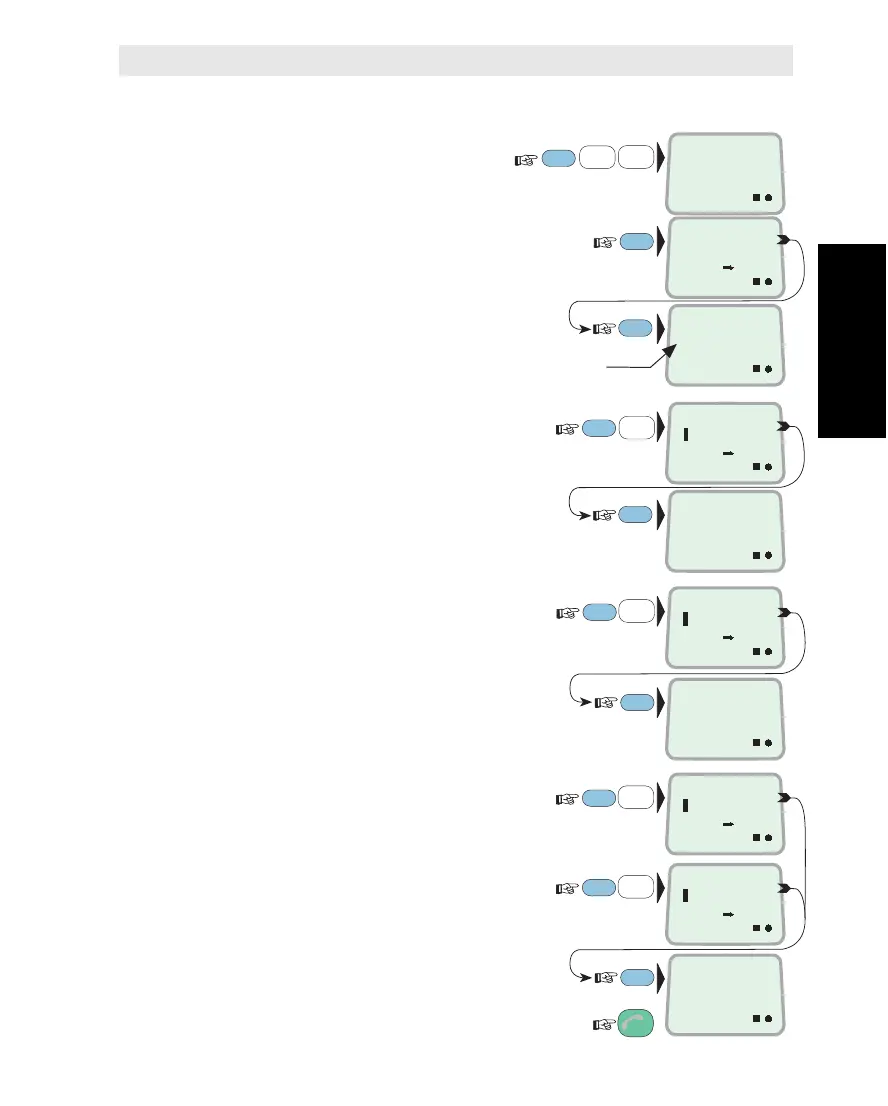
Selecting Destination and Autoprint
1 Select TRAFFIC
LOG SETUP function (82):
2 Check current destination of flush printout,
and number calls before automatic printout:
0=no autoprintout, 1=computer formatted
printout (without heading etc.) after every call.
3 Key in destination, e.g. 2 (to printer):
0=no output, 2=to printer,
3=to DTE port
(DTE is the only choice
for Saturn MiniPhone)
4 Key in number of calls before printout:
1 – 100 records, 0=disabled,
1=computer formatted printout
after every call
5
Choose whether or not the user log
should be flushed automatically when full:
6
Choose whether or not the port log
should be flushed automatically when full:
Automatic flush: printout after 100 calls,
and log is reset.
Revert to IDLE:
FUNC
ON
8
VWX
TAX
1
ABC
2
DEF
PLAY
8
VWX
TAX
1
ABC
TRAFFIC LOG
SETUP
82
ON
TO PRINTER
LIMIT: 12
ON
ENABLED
DISABLED
ON
0=NO, 2=PRINT
3=DTE PORT
ENTER
ENTER
ON
1 - 100
O = DISABLED
ESC
3x
MORE/
HELP
ON
PRINT TO
2
MORE/
HELP
Autoflushing of USER log ENABLED
Autoflushing of PORT log DISABLED
ENTER
2
DEF
PLAY
ENTER
MORE/
HELP
ON
MAX ENTRIES
8
ON
AUTOFLSH USR
1
ON
AUTOFLSH PRT
1
MORE/
HELP
ON
O=DISABLED
1=ENABLED
ENTER
Traffic Logging Cont’d



 To Next Page