6. Loop the battery cable around the cable channel on the side of the battery holder.
7. Position the battery pack by aligning the battery holder key ribs to the “V” notches on the sheet metal side
wall.
8. Slide the battery pack down along the sheet metal side wall until the support tabs on the side wall hook into
the slots on the battery pack, and the battery pack latch engages and clicks into the opening on the side
wall.
Step 4: Move the DIMMs
To move the DIMMs, you must follow the directions to locate and move them from the old controller module
into the replacement controller module.
About this task
You must have the new controller module ready so that you can move the DIMMs directly from the impaired
controller module to the corresponding slots in the replacement controller module.
Steps
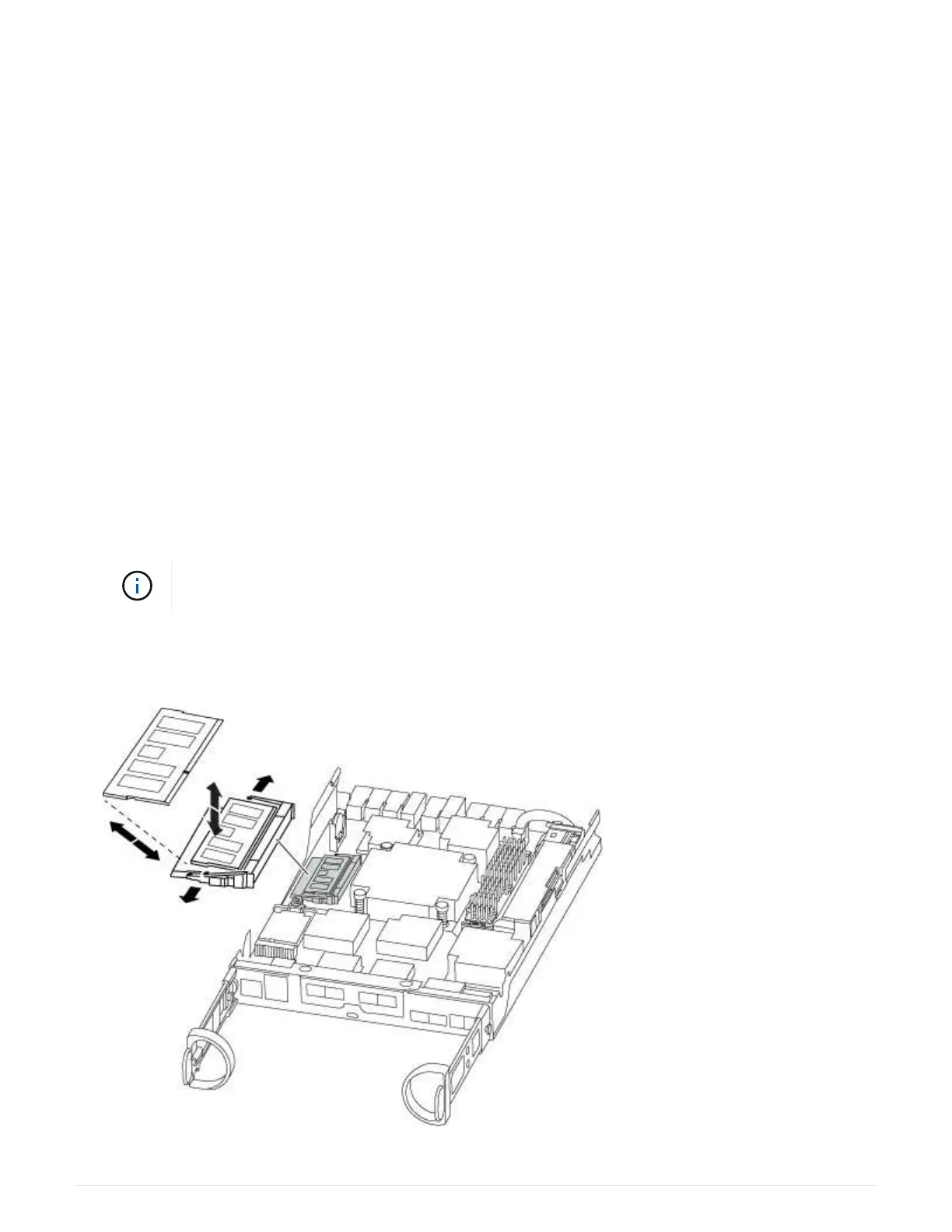
1. Locate the DIMMs on your controller module.
2. Note the orientation of the DIMM in the socket so that you can insert the DIMM in the replacement
controller module in the proper orientation.
3. Eject the DIMM from its slot by slowly pushing apart the two DIMM ejector tabs on either side of the DIMM,
and then slide the DIMM out of the slot.
Carefully hold the DIMM by the edges to avoid pressure on the components on the DIMM
circuit board.
The number and placement of system DIMMs depends on the model of your system.
The following illustration shows the location of system DIMMs:
33












 To Next Page