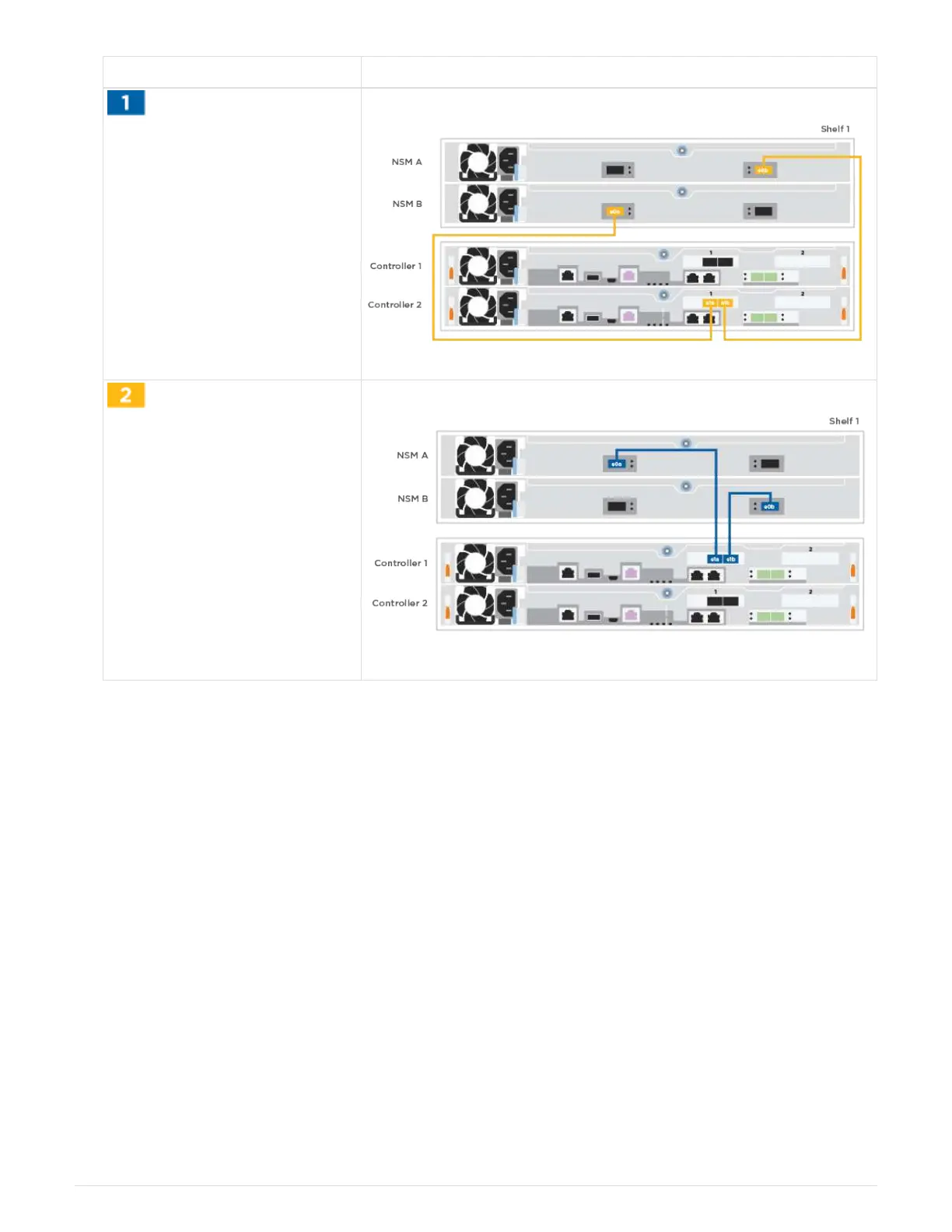
Step Perform on each controller module
Cable controller A to the shelf
Cable controller B to the shelf:
2. To complete setting up your system, see Step4: Completing system setup and configuration.
Step 4: Complete system setup and configuration
Complete the system setup and configuration using cluster discovery with only a
connection to the switch and laptop, or by connecting directly to a controller in the system
and then connecting to the management switch.
Option 1: Complete system setup and configuration if network discovery is enabled
If you have network discovery enabled on your laptop, you can complete system setup
and configuration using automatic cluster discovery.
1. Plug the power cords into the controller power supplies, and then connect them to power sources on
different circuits.
The system begins to boot. Initial booting may take up to eight minutes
2. Make sure that your laptop has network discovery enabled.
See your laptop’s online help for more information.
9












 To Next Page