If you cannot resolve the problem, contact technical support.
5. Collect support data for your storage array using SANtricity System Manager.
a.
Select Support
› Support Center › Diagnostics.
b. Select Collect Support Data.
c. Click Collect.
The file is saved in the Downloads folder for your browser with the name, support-data.7z.
6. Return the failed part to NetApp, as described in the RMA instructions shipped with the kit.
Contact technical support at
NetApp Support, 888-463-8277 (North America), 00-800-44-638277 (Europe),
or +800-800-80-800 (Asia/Pacific) if you need the RMA number.
What’s next?
Your HIC replacement is complete. You can resume normal operations.
Host port protocol
Requirements for changing the E5700 host port protocol
Before converting the host port protocol in the E5700, review the requirements.
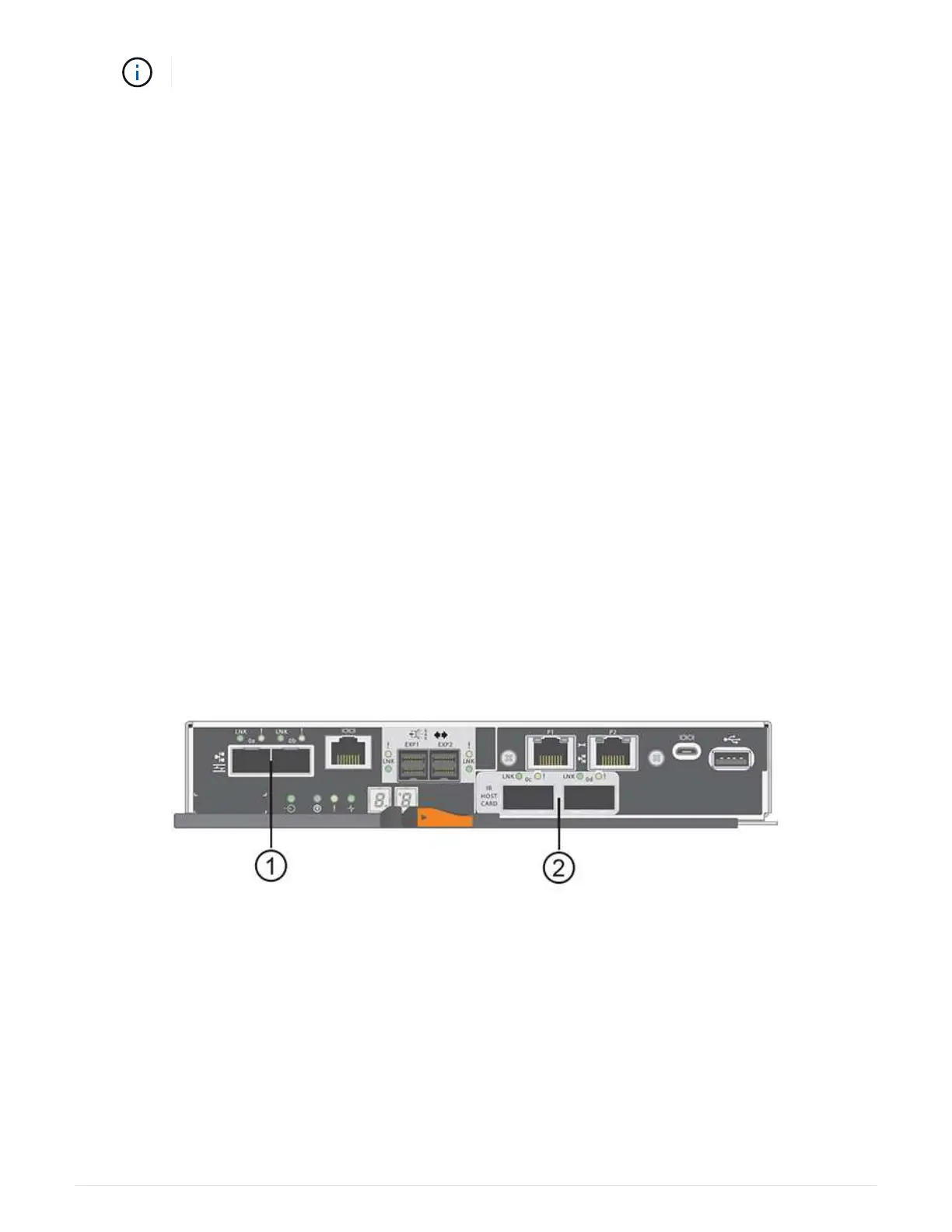
The following figure shows the E5700 with its SFP+ (optical) baseboard host ports (1) and the optional two IB
HIC ports (2).
Requirements
• You must schedule a downtime maintenance window for this procedure.
• You must stop host I/O operations when you perform the conversion, and you will not be able to access
data on the storage array until you have successfully completed the conversion.
• You must use out-of-band management. (You cannot use in-band management to complete this
procedure.)
• You have obtained the necessary hardware for the conversion. Your NetApp Sales Representative can
help you determine what hardware you need and help you order the correct parts.
113



 To Next Page