Port Forwarding Configuration Guide – Vodafone MachineLink 7 of 12
November 2019 v. 2.1 vodafone.netcommwireless.com
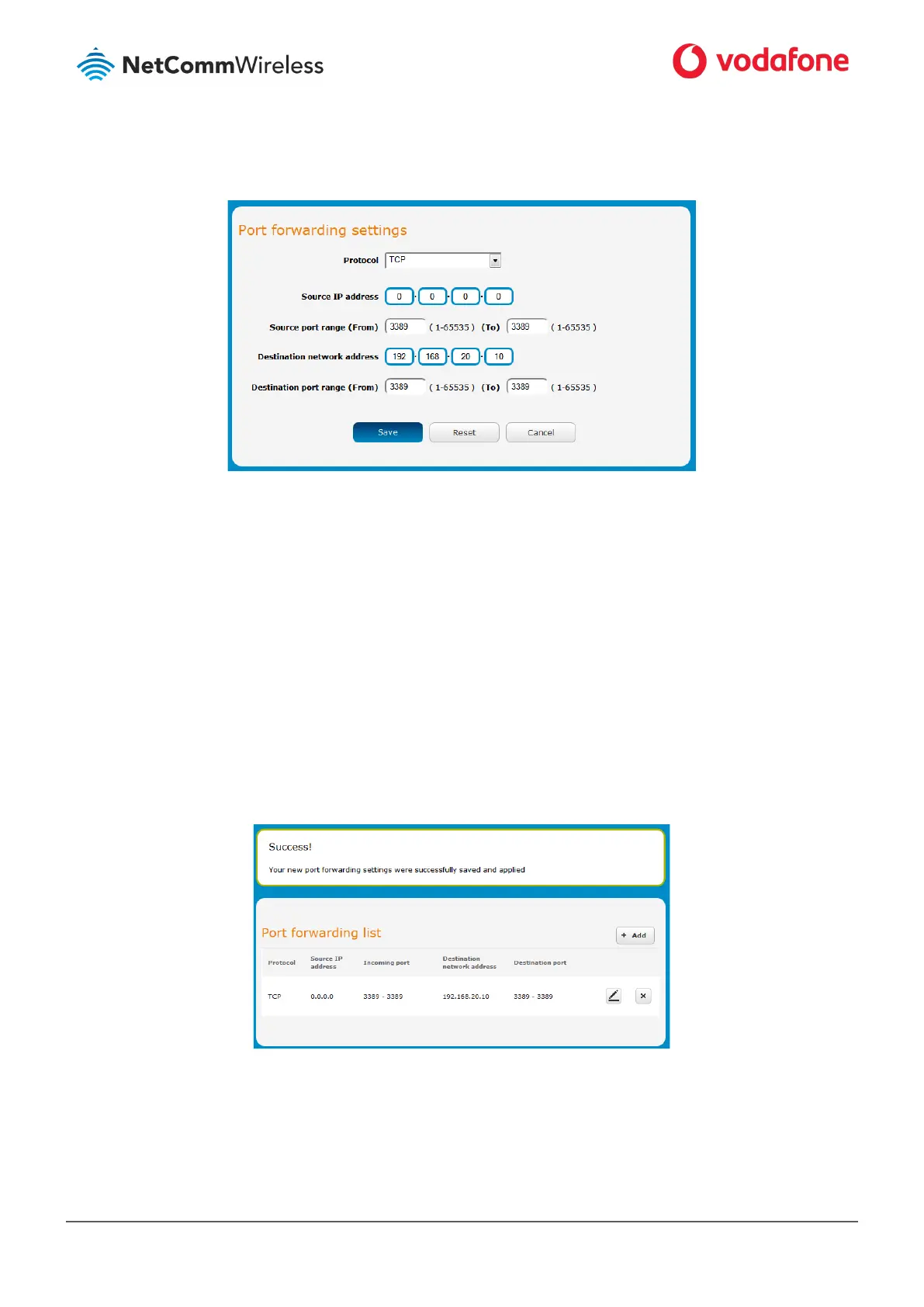
Figure 4: Entering the port forwarding rule details
6 In the Source IP address field, enter the address from which the traffic will originate. This is usually a WAN IP address originating
from the internet. In this example, we are setting the Source IP Address to 0.0.0.0 which allows connections from anywhere.
7 In the Source port range (From) and (To) fields, enter the range of ports to forward. For example, entering 6881 in the first field
and 6999 in the second field will forward the 19 ports between and including 6881 and 6999. If you wish to forward a single port,
enter the same port number in both the first and the second fields.
8 In the Destination networking address field, enter the local IP address of the LAN client to which port traffic will be forwarded.
9 In the Destination port range (From) and (To) fields, enter the port range for the destination. In many cases these ports will be
the same as the Incoming Port Range. If you wish to specify a single port, enter the same port number in both the first and the
second fields.
10 Click the Save button. The port forwarding rule is displayed at the bottom of the screen as highlighted in Figure 5 below.
Figure 5: A completed port forwarding rule



 To Next Page