
 Need help?
Do you have a question about the Netduma R2 and is the answer not in the manual?
 General
| Brand | Netduma |
|---|---|
| Model | R2 |
| Category | Wireless Router |
| Language | English |
Details the physical items included in the Netduma R2 package.
Lists all items provided in the Netduma R2 router box.
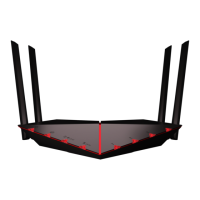
Explains the Netduma R2 router, highlighting its design for eliminating lag in online gaming.
Guides users on how to attach the four antennas to the router for optimal Wi-Fi performance.
Details the process of connecting the Netduma R2 to the ISP's modem and power source.
Explains how to connect wired devices, such as consoles and PCs, to the Netduma R2.
Guides users on the correct procedure to power on the Netduma R2 and the ISP modem.
Details how to connect wireless devices to the NetdumaR2 network using Wi-Fi settings.
Provides instructions on how to access the Netduma R2's administrative interface via a web browser.
Explains how Geo-Filter limits host/server distance to reduce lag and improve online gaming.
Explains how QoS addresses network congestion and lag caused by multiple devices using bandwidth.

 To Next Page