Network Settings
30
AC1200 WiFi Range Extender
The Status page displays.
4. If your browser displays the Menu icon
, click it.
The extender menu displays.
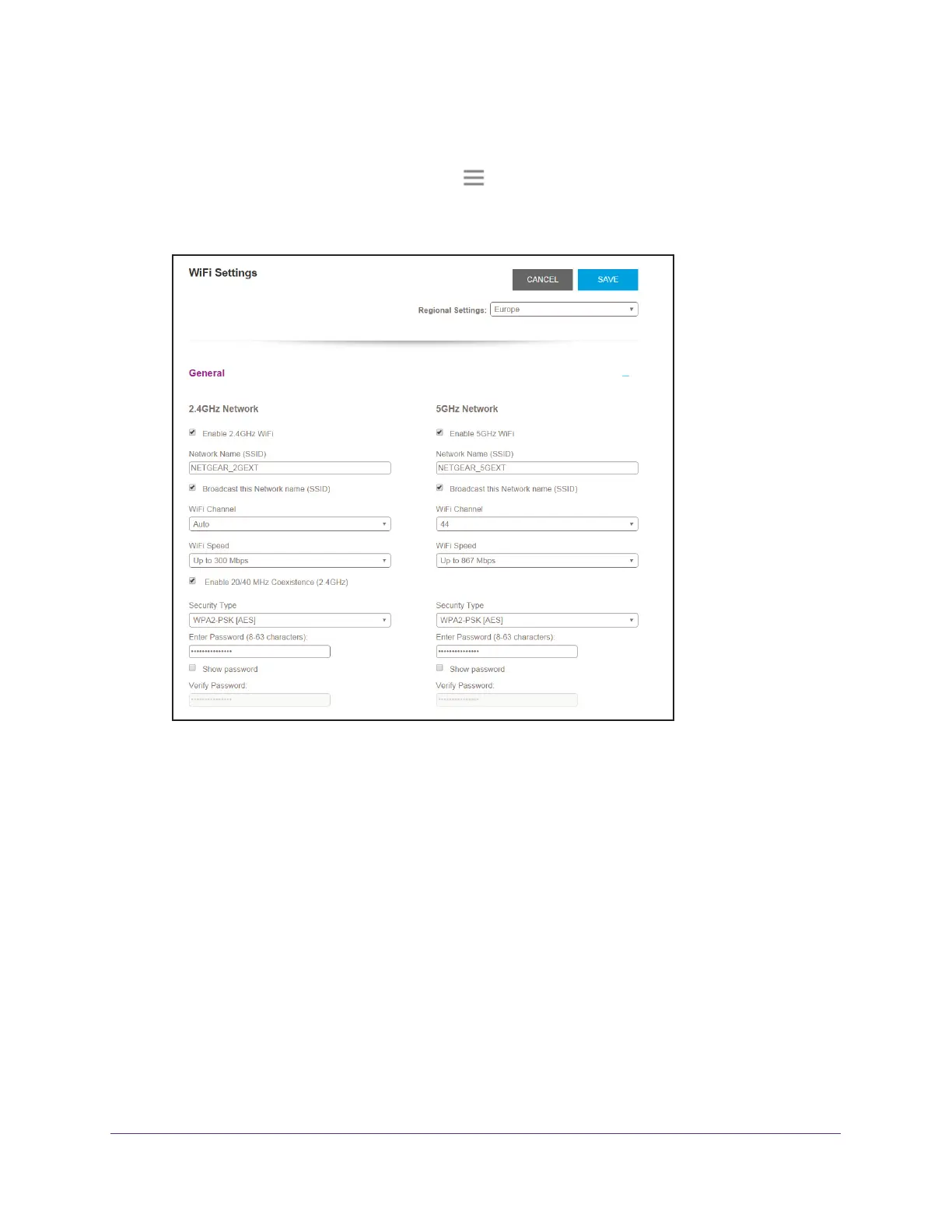
5. Select Settings > W
ireless.
6. In each WiFi Speed menu, select a speed.
7. Click the SA
VE button.
Your settings are saved.
Disable or Enable 20/40 MHz Coexistence for 2.4 GHz
WiFi
The extender’s 2.4 GHz WiFi network can run in either 40 MHz mode or 20 MHz mode. When
this feature is enabled, the extender uses 40 MHz mode unless a nearby WiFi network is
using 40 MHz mode. If that happens, the extender uses 20 MHz mode to coexist with that
network.
To enable or disable 20/40 MHz coexistence for 2.4 GHz WiFi:
1. On a computer or WiFi device that is connected to the extender network, launch a web
browser
.


 To Next Page