11
14. If your computer or WiFi device disconnects from the Trek, reconnect
your computer or WiFi device to the Trek.
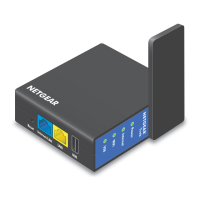
Use the Trek in Extender Mode
Use the Trek in extender mode to boosting an existing WiFi signal and
enhancing the overall signal quality over long distances. NETGEAR
recommends that you use the Trek in extender mode when a wireless
device is in a dead zone where the connection to your existing WiFi router
is poor or nonexistent.
NETGEAR
Power
Internet
WiFi
USB
Wired
Power Off
Wireles
¾ To use the Trek in extender mode:
1. Place your Trek in the same room as your WiFi router.
Note: Proximity to the WiFi router is required only during the initial
setup process.
2. Connect your Trek to a power source and rotate the antenna.
For more information, see Set Up Your Trek on page 6.
TrekWiFi Router


 To Next Page
 Loading...