EasyManua.ls Logo

NETGEAR XAVB2101 - User Manual

NETGEAR XAVB2101
2 pages
Print Icon
To Next Page IconTo Next Page
Loading...
Installation Guide
This symbol was placed in accordance with the European Union Directive
2002/96 on the Waste Electrical and Electronic Equipment (the WEEE
Directive). If disposed of within the European Union, this product should be
treated and recycled in accordance with the laws of your jurisdiction
implementing the WEEE Directive.
©2010 by NETGEAR, Inc. All rights reserved. NETGEAR and the NETGEAR logo are
registered trademarks of NETGEAR, Inc. in the United States and/or other countries.
Other brand and product names are trademarks or registered trademarks of their
respective holders. Information is subject to change without notice.
December 2010
LED and Button Descriptions
Item Description
Power LED Solid green. The electrical power is on.
Blinking green. The adapter is restarting or
setting up security.
Amber. Power saving mode.
Off. There is no electrical power.
Powerline
LED
Solid. The adapter is connected to a Powerline
network.
Blinking. The adapter is sending or receiving data.
Off. The adapter has not found any other
compatible Powerline devices using the same
encryption key.
The Pick A Plug feature lets you pick the electrical out-
let with the strongest link rate, indicated by the color
displayed by the LED:
Green: Link
rate > 80 Mbps
(Best)
Amber: Link rate >
50 and < 80 Mbps
(Better)
Red: Link
rate < 50
Mbps (Good)
Power LED
Powerline LED
Ethernet LED
Security
Reset
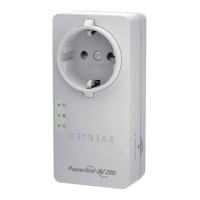
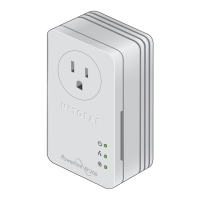
Powerline AV 200 Nano
Adapter Kit XAVB2101
Troubleshooting Tips
Power LED is off Make sure that power is supplied to the electrical outlet,
and that the Powerline devices are not plugged into an
extension cord, power strip, or surge protector.
Power LED is
amber
Power saving mode occurs when the Ethernet LED is off.
This can occur when:
The Ethernet cable is unplugged.
The device connected through the Ethernet cable is
turned off.
The adapter is idle for 10 minutes.
It returns to normal mode within 2 seconds once the
Ethernet link is up.
Powerline LED is
off
If you have set network security, make sure that all Power
line devices are using the same encryption key; see the
online User Manual for details.
Press the Reset button on each device for 1 second to
return the Powerline adapter to its factory default settings.
Powerline LED is
amber or red
Move the Powerline device to a closer location.
Ethernet LED is
not blinking
Make sure that the Ethernet cables are working and
securely plugged into the devices.
Press the Reset button on each device for 1 second to
return the Powerline adapter to its factory default settings.
Package Contents
Powerline AV 200
Nano Adapters
Ethernet Cables
Warning: Do not press the Security button on the
Powerline adapter until installation is complete and the
adapters are communicating with each other (indicated by
the blinking Powerline LED). Pressing this button too soon
can temporarily disable Powerline communication. If this
should occur, use the Factory Reset button to return the
Powerline adapter to its factory default settings.
Recording your Passwords
Before you install your XAV2101 adapters into
your existing Powerline network, find their passwords, which
are shown on the back of the devices, and record them
here:
_______________________________
_______________________________
Ethernet
LED
Solid. The Ethernet port is linked, but there is no
activity.
Blinking. There is traffic on the Ethernet port.
Off. There is no Ethernet connection.
Factory
Reset
Press the Factory Reset button for 1 second, then
release it to turn the Powerline adapter to its factory
default settings.
Security
Button
After you plug in your new AV adapter, press the secu-
rity button for 2 seconds, then press the security but-
ton on one of the other AV adapters in your existing
network for 2 seconds. Both buttons must be pressed
within 2 minutes.
Note: The Security button does not work in power
saving mode (see “Power LED is amber” in the
“Troubleshooting Tips” table below).
Item Description


Questions and Answers

  • J
    Jeremy ColemanAug 14, 2025
    How to fix a NETGEAR XAVB2101 when the Power LED is off?
    • M
      Marie SmithAug 14, 2025
      If the Power LED on your NETGEAR Adapter is off, ensure that the electrical outlet is supplying power. Also, verify that the Powerline devices are directly plugged into the wall and not connected to an extension cord, power strip, or surge protector.
  • L
    latkinsonAug 18, 2025
    Why is the Powerline LED off on my NETGEAR XAVB2101 and how do I fix it?
    • S
      Sean LarsenAug 18, 2025
      If the Powerline LED on your NETGEAR Adapter is off, and you've set up network security, ensure all Powerline devices use the same encryption key. Also, try resetting each device to its factory default settings by pressing the Reset button for one second.
  • S
    Stanley HopkinsAug 21, 2025
    What to do if the Powerline LED is amber or red on my NETGEAR Adapter?
    • G
      Gabriella GillAug 21, 2025
      If the Powerline LED on your NETGEAR Adapter is amber or red, move the Powerline device to a closer location.
  • R
    Rebecca SmithAug 25, 2025
    What to do if the Powerline LED on my NETGEAR XAVB2101 is amber or red?
    • P
      Paul WilsonAug 25, 2025
      If the Powerline LED on your NETGEAR Adapter is amber or red, try moving the Powerline device to a location that is closer.
  • Z
    Zachary DaltonAug 27, 2025
    Why is the Power LED on my NETGEAR XAVB2101 amber?
    • T
      thomashendersonAug 27, 2025
      The amber Power LED on your NETGEAR Adapter indicates a power saving mode, which occurs when the Ethernet LED is off. It should return to normal within 2 seconds once the Ethernet link is active.
  • C
    Cody CalderonAug 31, 2025
    How to fix a NETGEAR XAVB2101 Adapter when the Powerline LED is off?
    • S
      shernandezAug 31, 2025
      If the Powerline LED is off on your NETGEAR Adapter, and you have set network security, ensure that all Power line devices are using the same encryption key. You can also press the Reset button on each device for 1 second to return the Powerline adapter to its factory default settings.
  • J
    Jesse KellySep 3, 2025
    What to do if the Ethernet LED is not blinking on my NETGEAR Adapter?
    • A
      Alyssa LopezSep 3, 2025
      If the Ethernet LED on your NETGEAR Adapter isn't blinking, first ensure that the Ethernet cables are securely plugged into the devices and are functioning correctly. If the issue persists, try resetting each device by pressing the Reset button for one second to restore the Powerline adapter to its factory default settings.
  • I
    ibrockSep 6, 2025
    What to do if the Ethernet LED is off on my NETGEAR XAVB2101?
    • K
      Katrina JonesSep 6, 2025
      If the Ethernet LED on your NETGEAR Adapter is off, ensure that the Ethernet cables are working correctly and securely plugged into the devices. If the issue persists, press the Reset button on each device for 1 second to return the Powerline adapter to its factory default settings.
  • F
    folsenSep 10, 2025
    Why is the power LED off on my NETGEAR Adapter?
    • C
      Christopher FreemanSep 10, 2025
      If the power LED is off on your NETGEAR Adapter, ensure that power is supplied to the electrical outlet and that the Powerline devices are not plugged into an extension cord, power strip, or surge protector. Power saving mode also occurs if the Ethernet cable is unplugged, the device connected through the Ethernet cable is turned off, or the adapter is idle for 10 minutes.

Summary

LED and Button Descriptions

Device Indicators

Explains Power, Powerline, and Ethernet LEDs, including their states and the Pick A Plug feature.

Control Buttons

Details the function of the Factory Reset button and the Security button for pairing and defaults.

Recording Passwords

Password Location and Recording

Instructions to find and record the unique passwords for the Powerline adapters.

Troubleshooting Common Issues

Power LED and Powerline LED Troubleshooting

Addresses issues with the Power LED being off/amber and Powerline LED being off/amber/red.

Ethernet LED and Connectivity Troubleshooting

Covers troubleshooting for the Ethernet LED not blinking and general connectivity problems.

Product Information

Package Contents

Lists the included components in the Powerline AV 200 Nano Adapter Kit XAVB2101.

Safety and Technical Information

Provides safety precautions, operating temperature, and technical support contact details.

NETGEAR XAVB2101 Specifications

General IconGeneral
BrandNETGEAR
ModelXAVB2101
CategoryAdapter
LanguageEnglish

Related product manuals