11
ON-SCREEN MENUS & INFORMATION
iPlayer displays useful menus, information and available interactions
related to the current digital or interactive service screen.
} On-screen menus, popups and windows:
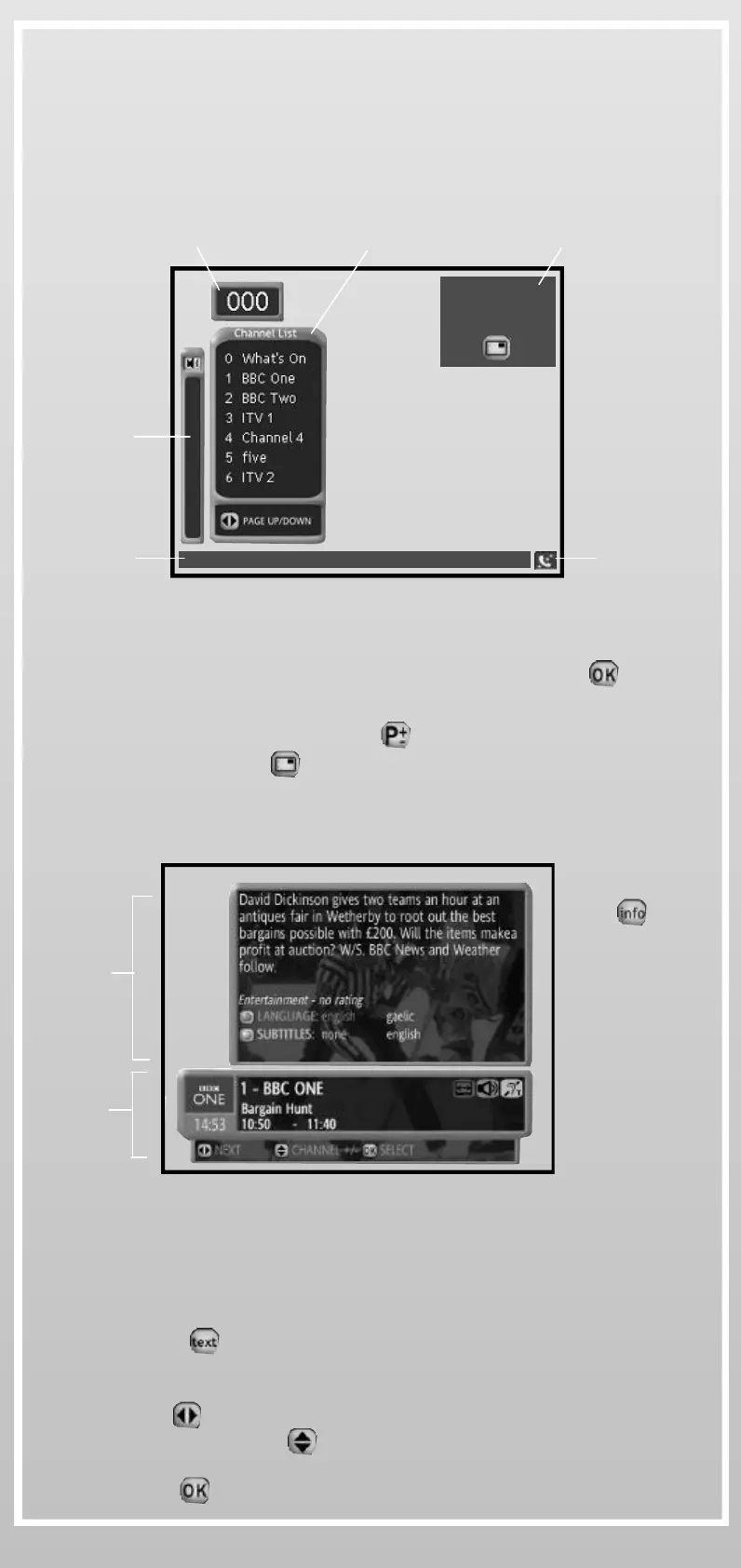
_ Channel List: Displays all available TV channels and radios. Use
the navigation keys to choose your channel and press to select
_ PiP (Picture-in-picture): Displays/hides a small TV windows while
using interactive services. Use to change programmes in PiP.
You can also press to freeze live television
} Information and interactions:
Status bar
PiP
Channel Number Channel List
PiP (Picture-in-picture)
The connection
icon appears
when iPlayer is
connected and
is animated
when data are
transfered
iPlayer
Status
Bar
Volume
Bar
On-screen Menus, popus and windows
On-screen information & interactions
• Use the coloured keys on your Wireless Keyboard or on your
Remote Control to select the desired interaction
When watching digital services you can:
• Press to launch digital Text service* (Info Bar must be
closed)
• Use to switch between the Now and Next programme
information and to display information* related to other
channels*.
Press to change channel
More Info
Bar
Info
Bar
Press once
to display the
Info Bar and
twice to display
the More Info
Bar.
Press again to
close
* When available


 To Next Page